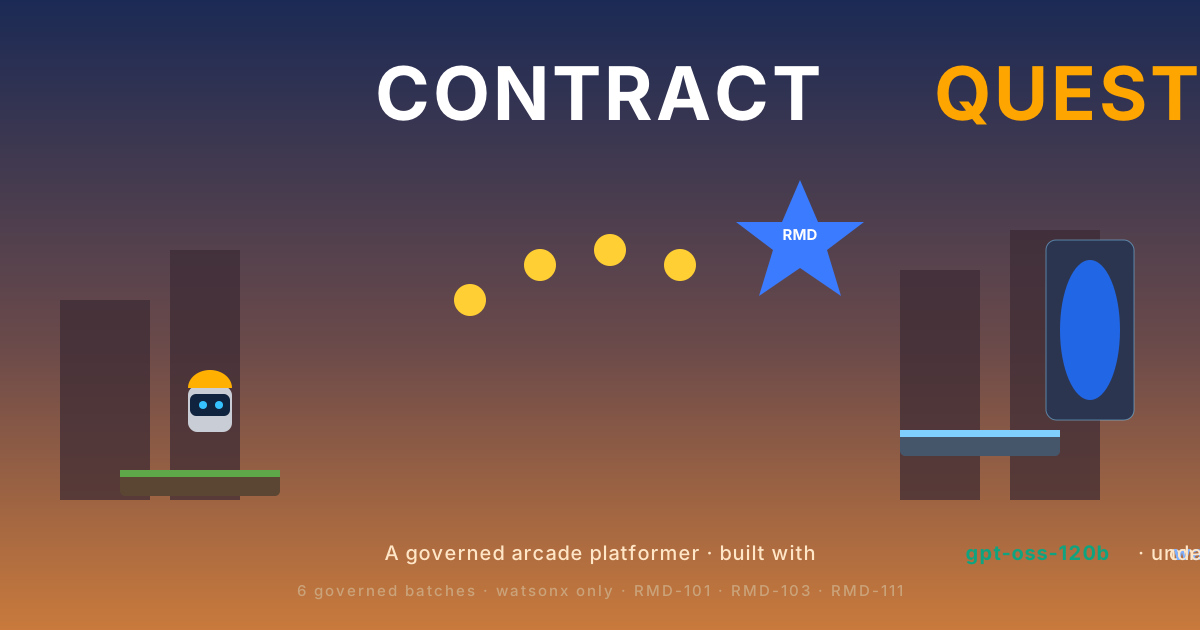

Contract Quest: Rebuilding an AI Game from Zero with watsonx.ai
A small game, and a bigger question
I started Contract Quest with a simple question in mind.
Could an AI-generated game become something more serious than a one-time demo?
Most of us have seen the usual version of AI coding. You open a chat, write something like “make me a game,” wait a little, and get a folder full of code. Sometimes it runs. Sometimes it looks impressive. Sometimes it breaks the moment you try to change it.
That is fun, but it is not enough if you care about reproducibility.
I wanted to know whether I could build a game in a way that another developer could repeat from zero. Not just copy the finished files. Not just trust a nice screenshot. Actually rebuild the project step by step, with logs, checks, and evidence.
That experiment became Contract Quest.
Contract Quest is a static browser platformer. The player controls a small robot hero inside a contract-themed pixel world. The hero collects Contract Coins and Validation Gems, reads RMD panels, reaches checkpoints, uses Shield and Double Jump power-ups, fights Bug Bots and Prompt Slimes, and finally defeats the Rogue Architect before entering the Matrix Gate.
The game is the visible part.
The more interesting part is the pipeline behind it.
I did not want the model to wander freely through the repository. I wanted every stage to have a boundary. The design should come first. The implementation should happen in small batches. Each batch should know which files it may change. Each step should be verified. If something fails, the repair should be based on evidence, not on guessing.
That is why this project uses Matrix Designer, Matrix Builder, GitPilot, and IBM watsonx.ai.
Matrix Designer describes the game before code is written. Matrix Builder turns that design into governed batches. GitPilot asks the model to implement one bounded batch at a time. IBM watsonx.ai provides the model runtime. The build script ties the whole process together and writes evidence as it goes.
The result is a game, but the real product is the method.
The shortest way to reproduce it
If the repository is public and already contains the production Makefile, .env.example, and build.sh, the build should feel simple.
Open a terminal and run this from a clean workspace.
git clone https://github.com/ruslanmv/contract-quest-watsonx
cd contract-quest-watsonx

cp .env.example .env
Now edit .env with your real IBM watsonx.ai values. After that, normalize the scripts and run the build.
dos2unix Makefile build.sh .env
chmod +x build.sh

make install
make build
That is the ideal experience.
The rest of this article explains what those commands do, why they are needed, and how to fix the most common problems when the build environment is not clean yet.
Before publishing this post, make sure the GitHub repository URL is public and correct. If the repository is private, the reader will not be able to reproduce the project from the commands above. In that case, either make the repository public, replace the URL, or provide a release archive with the required files.
What you need before starting
This tutorial assumes you are using WSL or Linux. It also assumes you are comfortable with the terminal, Git, Node.js, npm, Python virtual environments, and IBM watsonx.ai project credentials.
You do not need a backend to play the final game. You do not need a database. You do not need a runtime watsonx.ai key in the browser. The credentials are only needed while generating the project through GitPilot.
For the smoothest result, use Python 3.11 or 3.12 and a recent Node.js LTS version. I recommend checking the tools before running the build.
python3.11 --version
node --version
npm --version
git --version
uv --version
If uv is missing, install it first.
curl -LsSf https://astral.sh/uv/install.sh | sh
source ~/.bashrc
uv --version
If your default Python is too new for one of the local tools, use Python 3.11 explicitly.
make install PYTHON=python3.11
The goal is not to make the environment clever. The goal is to make it boring, predictable, and easy to repeat.
Setting up watsonx.ai
The project needs a .env file in the root folder.
The safest way is to start from the example file.
cp .env.example .env
Then open .env and fill in your real values.
GITPILOT_PROVIDER=watsonx
WATSONX_API_KEY=replace-with-your-ibm-cloud-api-key
WATSONX_PROJECT_ID=replace-with-your-watsonx-project-id
PROJECT_ID=replace-with-your-watsonx-project-id
WATSONX_URL=https://us-south.ml.cloud.ibm.com
WATSONX_BASE_URL=https://us-south.ml.cloud.ibm.com
GITPILOT_WATSONX_MODEL=openai/gpt-oss-120b
GITPILOT_MAX_TOKENS=24000
Be careful with this file.
Do not commit it. Do not print your API key in logs. Do not leave trailing spaces after the URL or the project ID. A single invisible space at the end of WATSONX_URL can cause confusing errors later.
You can check the environment without exposing the secret.
set -a
source .env
set +a

python - <<'PY'
import os

print("WATSONX_URL =", repr(os.getenv("WATSONX_URL")))
print("WATSONX_PROJECT_ID configured =", bool(os.getenv("WATSONX_PROJECT_ID")))
print("PROJECT_ID configured =", bool(os.getenv("PROJECT_ID")))
print("API key configured =", bool(os.getenv("WATSONX_API_KEY")))
PY
If the printed URL looks like this, it is wrong.
'https://us-south.ml.cloud.ibm.com '
It should look like this instead.
'https://us-south.ml.cloud.ibm.com'
The other common issue is the region. If watsonx.ai returns container_not_found, the API key usually cannot access the project ID in the configured region. Make sure the project ID and WATSONX_URL belong together.
Installing the local tools
The build depends on three local commands: mdesign, mb, and gitpilot.
They should come from the project virtual environment, not from a global installation in your home directory.
Run the installation first.
make install
Then check the command paths.
which mdesign
which mb
which gitpilot
They should point inside the current repository, under .venv/bin.
/path/to/contract-quest-watsonx/.venv/bin/mdesign
/path/to/contract-quest-watsonx/.venv/bin/mb
/path/to/contract-quest-watsonx/.venv/bin/gitpilot
This detail matters.
If mb comes from ~/.local/bin, you may get errors that do not match the project. You may also accidentally run an older or different version of Matrix Builder. The build script is designed to force local tools because reproducibility starts with using the same tools every time.
You can also check that the Python imports are available.
.venv/bin/python - <<'PY'
import agent_generator.mb
import litellm
import tokenizers

print("governed Python imports ok")
PY
When this passes, the local toolchain is ready.
What the build script really does
The heart of the project is build.sh.
It is not just a convenience command. It is the executable version of the article.
The script loads .env, isolates the virtual environment, checks that the governed tools are being used, validates the watsonx.ai and GitPilot configuration, runs Matrix Designer, prepares Matrix Builder, executes the implementation batches, verifies the result, and writes evidence.
In other words, the script turns the idea into a repeatable process.
When you run this command, you are not simply asking AI to generate files.
make build
You are running a controlled workflow.
The Makefile should call the build script in a way that puts the local virtual environment first.
PATH="$PWD/.venv/bin:$PATH" \
PYTHONNOUSERSITE=1 \
REQUIRE_GOVERNED_TOOLS=1 \
./build.sh from-zero
That small detail prevents accidental global tools from entering the build.
Designing before generating
The first real stage is design.
This is the part I care about most, because it changes the relationship with the AI model.
Instead of starting with “write the code,” the workflow starts with “describe the product.” Matrix Designer creates a blueprint and then turns that blueprint into a design bundle. The bundle captures the player promise, visual direction, architecture, entities, acceptance criteria, audio rules, and implementation roadmap.
The manual version looks like this.
mdesign blueprints \
  --idea "Contract Quest: a premium static browser platformer rebuilt through Matrix Designer, Matrix Builder, GitPilot, and IBM watsonx.ai governance." \
  -o design/blueprint.json

mdesign design \
  --idea "Contract Quest: a premium static browser platformer rebuilt through Matrix Designer, Matrix Builder, GitPilot, and IBM watsonx.ai governance." \
  --blueprint design/blueprint.json \
  -o design/contract-quest-design-bundle.json

mdesign validate design/contract-quest-design-bundle.json

mdesign export \
  design/contract-quest-design-bundle.json \
  -o design/contract-quest-mb-export.json
This is slower than asking for a game in one prompt, but it gives the project a shape before generation begins.
That shape matters.
Without it, the model can invent architecture, add files freely, skip checks, hide assumptions, or produce code that works only once on one machine. With the design bundle, the model has a target and the build has something to validate.
Turning the design into batches
After the design is exported, Matrix Builder turns it into a governed plan.
The plan starts with a design validation batch, then moves into the project scaffold, runtime framework, art, levels, hero behavior, rewards and gates, enemies and power-ups, boss logic, audio polish, mobile accessibility, and release evidence.
I prefer thinking about these as chapters in the build story.
The first chapter proves the design exists. The next chapter creates the skeleton. Then the game gets its runtime, its world, its player, its collectibles, its enemies, its boss, its sound, its touch controls, and finally its release evidence.
That is easier to understand than one giant AI request.
A small batch is easier to inspect. A small batch is easier to repair. A small batch is easier to verify. Most importantly, a small batch gives the AI less room to damage unrelated parts of the project.
Starting from a clean state
Before implementation begins, the script removes stale Matrix Builder state and generated frontend outputs.
The manual version is simple.
rm -rf .mb

mb init \
  "Contract Quest: a premium static browser platformer rebuilt through Matrix Designer, Matrix Builder, GitPilot, and IBM watsonx.ai governance." \
  --quality standard \
  --title "Contract Quest"
This step may not feel exciting, but it matters. Reproducibility is often lost through old local state. If a previous run left files behind, a new run may pass for the wrong reason. Starting clean makes failures more honest and successes more meaningful.
The design batch must stay design-only
One lesson from this build is worth calling out clearly.
D-1-design is not an implementation batch.
It should not call GitPilot. It should not call mb next. It should not run Matrix Builder implementation checks. It should only validate the design and export the plan.
The correct proof is this.
mdesign validate design/contract-quest-design-bundle.json

mdesign export \
  design/contract-quest-design-bundle.json \
  -o design/contract-quest-mb-export.json
If this stage accidentally flows into implementation behavior, Matrix Builder may try to invent work for a task that was supposed to be design-only. That can lead to confusing failures.
Keeping this batch clean makes the rest of the workflow easier to trust.
Generating code with boundaries
Once the design has been validated, the real implementation batches begin.
For each batch, the script prepares a prompt, starts the governed batch, calls GitPilot, runs verification, checks only the allowed files, and records what happened.
The GitPilot command usually looks like this.
gitpilot generate -m "$(cat .build/evidence/prompts/<batch-id>.md)" -o .
Some GitPilot versions support a prompt file directly.
gitpilot generate \
  --prompt-file .build/evidence/prompts/<batch-id>.md \
  -o .
The production script can detect which option is available and choose the right one.
The important part is not the flag. The important part is the boundary.
GitPilot receives a prompt for one batch. It is not asked to rewrite the whole repository. It is not asked to improvise the entire architecture. It is asked to make a specific change inside a governed scope.
That is the difference between a demo and a reproducible build.
Verifying each step
Every implementation batch has to prove itself.
Most batches run the normal Node.js checks.
npm install
npm run build
npm run verify
npm run smoke
Then Matrix Builder checks the files changed by that batch.
mb check --changed <allowed files only>
This is one of the most important commands in the project.
It is tempting to run a full repository check.
mb check --repo .
In this workflow, that is the wrong choice inside the batch loop.
A full repository scan can include local tool checkouts, .venv, node_modules, and other generated folders. That can produce scary but misleading messages about secrets, dependencies, or files outside the allowed scope.
The build should check the files that belong to the batch. That keeps the signal clean.
There are only two special cases.
The design-only batch uses mdesign validate as its proof.
The scaffold batch may skip smoke tests and Matrix checks because it is creating the first contract files and there may not be a playable game yet.
After that, the normal implementation batches should build, verify, smoke test, and pass the scoped Matrix check.
Repairing with evidence
Failures are not a reason to panic. They are part of the workflow.
What matters is how the repair happens.
A repair should not be a blind retry. It should be based on the failing command and limited to the same batch scope. If the build failed because of a runtime issue, the repair should focus on that. If the smoke test failed because of layout or viewport behavior, the repair should focus on that. If the boss gate logic failed, the repair should focus on gameplay and progression.
The repair prompt should be strict.
Repair only within the original batch allow-list.
Preserve all working features.
Do not print, request, or commit secrets.
Do not invent Matrix commit IDs.
Use the failing command output as the source of truth.
This makes the repair feel less like rolling dice.
The model is not being asked to try again randomly. It is being asked to respond to evidence.
Writing evidence
At the end of the build, or when the build fails, the script writes EVIDENCE.md.
That file is important because it keeps the story honest.
It should say when the generation happened, which provider and model were used, where the design bundle is, where the Matrix Builder export is, which batches ran, which commands passed, which commands failed, whether screenshots exist, whether deployment happened, and what limitations remain.
If a smoke test did not run, the evidence should say so.
If deployment was skipped, the evidence should say so.
If the build failed halfway through, the evidence should say where it failed.
The blog should not claim more than the evidence supports.
That is the rule.
Common problems I hit
The most common problem is running the wrong local command.
If you see this error, the wrong mb is probably being used.
ModuleNotFoundError: No module named 'agent_generator'
Run this.
make install
which mb
The result should point to the project virtual environment.
$PWD/.venv/bin/mb
Another common problem happens when .venv/bin is added to the path before the virtual environment is recreated. That can lead to an error like this.
/mnt/.../.venv/bin/uv: No such file or directory
The fix is to make sure the Makefile uses the external uv command while it is creating the virtual environment, then uses the virtual environment after it exists.
A schema problem can also happen if metadata is added to the wrong place in the design bundle.
provenance.provider was unexpected
The fix is to keep provider and model information in contract-quest-mb-export.json, not inside the validated design bundle provenance.
Another confusing issue appears when Matrix Builder scans local tool folders.
SEC-001: Possible secret committed in .tools/...
This usually means the check scanned too much. The batch loop should use this instead.
mb check --changed <allowed batch files>
It also helps to ignore local generated folders.
cat >> .gitignore <<'EOF'
.tools/
.venv/
.build/
node_modules/
dist/
test-results/
playwright-report/
.pytest_cache/
.env
EOF
If you see a segmentation fault after the design export, check whether the design-only batch accidentally continued into implementation behavior. D-1-design should skip mb next, GitPilot, npm verification, and mb check.
If watsonx.ai returns container_not_found, check the region and project ID. The API key must have access to the configured project in the configured region.
WATSONX_URL=https://us-south.ml.cloud.ibm.com
WATSONX_PROJECT_ID=your-real-project-id
PROJECT_ID=your-real-project-id
After fixing the configuration, reset the local GitPilot config and run the build again.
rm -rf .build/gitpilot_config
make build
Knowing when the project is ready
Contract Quest is ready to publish only when the evidence supports the claims.
The design bundle should exist and pass validation. The Matrix Builder batches should come from the exported design. The game should build. The static verifier should pass. The smoke test should pass, or the evidence should clearly explain why it could not run. Matrix checks should run only on scoped files. The final game should not require watsonx.ai credentials at runtime. The boss gate should not be skippable. WebAudio should start only after a user gesture. If deployment is enabled, the public deployment should return HTTP 200.
That may sound strict, but it is the point of the project.
A reproducible AI build should not depend on trust alone. It should leave evidence behind.
What should be in the repository
For the cleanest reader experience, the repository should include the production Makefile, .env.example, build.sh, README, design folder, frontend folder, scripts folder, and tests folder.
The build script should live directly in the repository.
A Gist is useful for embedding the script in a blog post, but it should not be the only place where the production script exists. A reader should be able to clone the repository, copy .env.example, edit credentials, and run the documented commands without hunting through another page.
Final reproduction command
The whole process should come back to this.
git clone https://github.com/ruslanmv/contract-quest-watsonx
cd contract-quest-watsonx

cp .env.example .env
# Edit .env with your real watsonx.ai values.

dos2unix Makefile build.sh .env
chmod +x build.sh

make install
make build
If the build succeeds, open the generated evidence file and read it before publishing.
If deployment is enabled, the evidence should include the public URL and the HTTP result.
If deployment is not enabled, the evidence should say that deployment was skipped.
The production build script
The script below is the executable summary of this article.
It loads the environment, isolates the virtual environment, validates the Matrix Designer bundle, normalizes the Matrix Builder export, skips implementation behavior for the design-only batch, runs GitPilot for real implementation batches, checks only allowed files, and writes evidence.
You can embed the production build script here.
Final word
Contract Quest began as a small game idea.
It became a way to think about AI software production.
The lesson is simple. Do not ask the model to do everything at once. Give the project a design. Give each batch a boundary. Verify each step. Repair only when there is evidence. Publish only what the evidence supports.
That is how an AI-generated demo becomes something another developer can reproduce.
The game is the artifact people can see.
The pipeline is the part I wanted to prove.
Leave a comment