

Agent Planning and Reasoning with ReAct: Build a Python Email Triage Agent from Scratch
Most language-model examples ask the model a question and expect an answer immediately. That works for simple tasks, but many real tasks need more than one step.
Imagine an email that says your account is locked and asks you to click a link. A model can guess whether it looks suspicious, but a better agent should investigate first. It should check the sender, scan the link, observe the results, and only then make a decision.
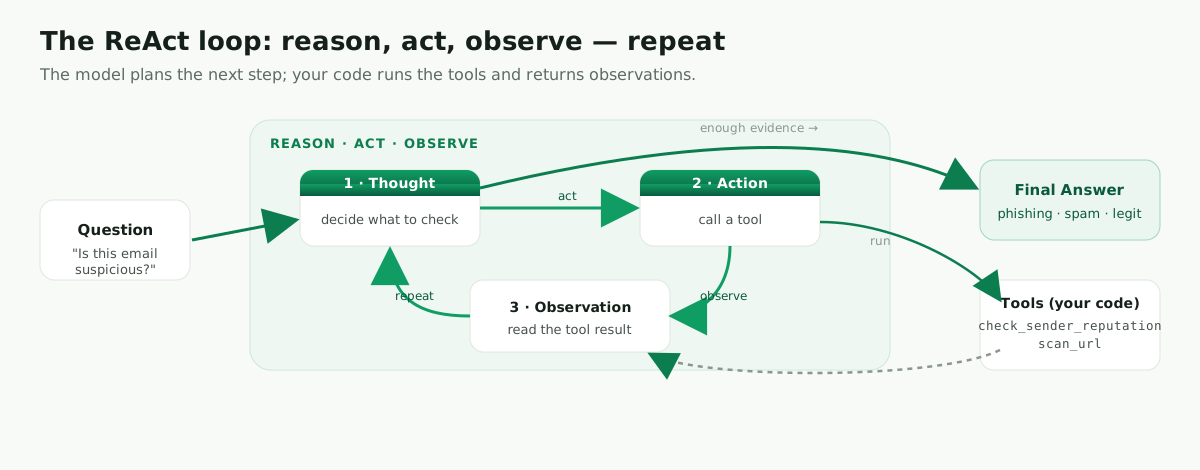
That is the idea behind ReAct: the model reasons about what to do next, takes an action by calling a tool, observes the result, and repeats until it has enough evidence to answer.
This is the reasoning core of my Agentic AI Tutorial (live version).
What is ReAct?
ReAct is short for Reason + Act. Instead of answering in one shot, the model interleaves reasoning and tool use: it decides what it needs, calls a tool to get it, reads the result, and continues. The model plans the steps; your application runs the tools.
The ReAct loop in plain English
In tutorials, ReAct is often shown with Thought, Action, Observation, and Final Answer. This makes the loop easy to understand. In production you usually expose the action, observation, and final result — but not the model’s private reasoning. The important idea is not to show the reasoning to the user; it’s to let the agent gather evidence before answering.
Question: Is this email suspicious?

Step 1:
The agent decides it needs sender information.
Action: check_sender_reputation("[email protected]")
Observation: score=5, verdict=suspicious

Step 2:
The agent decides it should inspect the link.
Action: scan_url("http://login-verify.paypa1-support.com")
Observation: phishing

Final:
The sender and URL are both suspicious.
Verdict: phishing
Prerequisites
- Python 3.10+
- An OpenAI API key (
export OPENAI_API_KEY=sk-...)
Build ReAct from scratch in Python
This version makes the loop explicit so you can see it. The model returns an Action (or a Final Answer), and our Python code runs the tool and feeds back the observation. It’s a teaching version — production systems use native tool calling instead of parsing text — but nothing teaches the pattern better than building it once.
import os
import re
from openai import OpenAI

client = OpenAI(api_key=os.getenv("OPENAI_API_KEY"))


def check_sender_reputation(email_address: str) -> str:
    """Return a simple sender reputation result."""
    known_bad_senders = {"[email protected]", "[email protected]"}
    email_address = email_address.lower()
    if email_address in known_bad_senders:
        return "score=5 verdict=suspicious reason=sender is in known bad sender list"
    return "score=85 verdict=trusted reason=sender is not in known bad sender list"


def scan_url(url: str) -> str:
    """Return a simple URL scan result."""
    suspicious_terms = ["login-verify", "paypa1", "secure-update", "bit.ly"]
    url_lower = url.lower()
    for term in suspicious_terms:
        if term in url_lower:
            return f"verdict=phishing reason=URL contains suspicious term: {term}"
    return "verdict=clean reason=no suspicious terms found"


TOOLS = {"check_sender_reputation": check_sender_reputation, "scan_url": scan_url}

SYSTEM_PROMPT = """
You are an email security agent.

You can use tools to investigate an email before giving a final verdict.

Use this exact format when you need a tool:

Action: tool_name: input

When you have enough evidence, respond with:

Final Answer: phishing | spam | legitimate

Available tools:
- check_sender_reputation: checks whether a sender looks suspicious
- scan_url: checks whether a URL looks suspicious
"""


def run_react_agent(question: str, max_steps: int = 5) -> str:
    messages = [
        {"role": "system", "content": SYSTEM_PROMPT},
        {"role": "user", "content": question},
    ]

    for step in range(max_steps):
        response = client.chat.completions.create(
            model="gpt-4o-mini", messages=messages, temperature=0,
        )
        reply = response.choices[0].message.content
        print(f"\nAgent step {step + 1}:\n{reply}")
        messages.append({"role": "assistant", "content": reply})

        if "Final Answer:" in reply:
            return reply.split("Final Answer:")[-1].strip()

        match = re.search(r"Action:\s*(\w+):\s*(.+)", reply)
        if not match:
            return "The agent did not return a valid action."

        tool_name = match.group(1)
        tool_input = match.group(2).strip()
        observation = TOOLS[tool_name](tool_input) if tool_name in TOOLS else f"unknown tool: {tool_name}"
        print(f"Observation: {observation}")
        messages.append({"role": "user", "content": f"Observation: {observation}"})

    return "The agent reached the maximum number of steps."


if __name__ == "__main__":
    if not os.getenv("OPENAI_API_KEY"):
        raise RuntimeError("Please set OPENAI_API_KEY before running this script.")

    email = """
From: [email protected]
Subject: Your account is locked

Please verify your account at http://login-verify.paypa1-support.com
"""
    final_answer = run_react_agent(f"Investigate this email and classify it:\n\n{email}")
    print("\nFinal verdict:", final_answer)
How the scratch loop works
This example is intentionally small. The model does not scan the URL by itself — instead, it asks Python to run a tool. Python executes the function, returns an observation, and the model uses that new information to decide what to do next.
That is the core ReAct pattern: the model plans the next step, but your application controls the tools. Notice the safety details too — a real function instead of a lambda, an API-key check, handling of unknown tools, a max_steps cap, and a printed observation at each step so you can follow along.
Build the same agent with LangChain and LangGraph
The scratch version is great for understanding the mechanics. But in real applications, parsing model text with regular expressions is fragile — a small formatting change can break the loop.
LangChain and LangGraph give you a cleaner version of the same idea. You define tools as Python functions, pass them to the agent, and let the framework handle tool calls, message history, and execution.
import os
from langchain_core.tools import tool
from langchain_openai import ChatOpenAI
from langgraph.prebuilt import create_react_agent


@tool
def check_sender_reputation(email_address: str) -> str:
    """Check whether an email sender is trusted or suspicious."""
    known_bad_senders = {"[email protected]", "[email protected]"}
    if email_address.lower() in known_bad_senders:
        return "score=5 verdict=suspicious reason=sender is in known bad sender list"
    return "score=85 verdict=trusted reason=sender is not in known bad sender list"


@tool
def scan_url(url: str) -> str:
    """Check whether a URL looks like phishing."""
    suspicious_terms = ["login-verify", "paypa1", "secure-update", "bit.ly"]
    for term in suspicious_terms:
        if term in url.lower():
            return f"verdict=phishing reason=URL contains suspicious term: {term}"
    return "verdict=clean reason=no suspicious terms found"


def main():
    if not os.getenv("OPENAI_API_KEY"):
        raise RuntimeError("Please set OPENAI_API_KEY before running this script.")

    model = ChatOpenAI(model="gpt-4o-mini", temperature=0)
    agent = create_react_agent(model=model, tools=[check_sender_reputation, scan_url])

    email = """
From: [email protected]
Subject: Your account is locked

Please verify your account at http://login-verify.paypa1-support.com
"""
    result = agent.invoke({
        "messages": [("user", f"Investigate this email. Use tools when useful, then classify it:\n\n{email}")]
    })
    print(result["messages"][-1].content)


if __name__ == "__main__":
    main()
This version does the same job as the scratch implementation, but the framework handles the agent loop. You still write the tools and still choose the model — you just don’t parse Action lines or append observations yourself. You also get retries, tool validation, and tracing (e.g. LangSmith) for free.
Add structured output with Pydantic
Returning a sentence is fine for a demo. But real applications usually need structured data — for example, an API may need a category, a confidence score, and a short explanation.
from pydantic import BaseModel, Field
from langchain_openai import ChatOpenAI


class EmailVerdict(BaseModel):
    category: str = Field(description="One of: phishing, spam, legitimate")
    confidence: float = Field(ge=0, le=1)
    rationale: str = Field(description="Short explanation based on the evidence")


structured_model = ChatOpenAI(model="gpt-4o-mini", temperature=0).with_structured_output(EmailVerdict)

evidence = """
Sender reputation: score=5 verdict=suspicious reason=sender is in known bad sender list
URL scan: verdict=phishing reason=URL contains suspicious term: login-verify
"""

verdict = structured_model.invoke(f"""
Convert this evidence into a structured email security verdict.

Evidence:
{evidence}
""")

print(verdict.category)     # phishing
print(verdict.confidence)   # 0.97
print(verdict.rationale)    # Suspicious sender and look-alike verification URL.
The realistic workflow is two steps: let the agent gather evidence with tools, then let a structured model format the final, machine-readable verdict — easy to drop into APIs, databases, and dashboards.
When ReAct is useful — and when it’s overkill
ReAct works well when the answer depends on information the model does not already have. It is useful for tasks that need API calls, database lookups, calculations, search, validation, or several steps of investigation.
It is not always necessary. If you only need to summarize a paragraph or classify a simple message, a direct model call is usually faster, cheaper, and easier to maintain.
The main risk with ReAct is looping — the agent may keep calling tools without reaching a final answer. Always set a maximum number of steps, use clear tool descriptions, and define a stopping condition.
Common mistakes
- Vague tool docstrings — the model chooses tools from their names and descriptions; if they’re unclear, it won’t call the right one (or any).
- No step limit — without a
max_stepscap or stop condition, a loop can run away and burn tokens. - Parsing text in production — the scratch regex is for learning; prefer native tool calling for anything real.
FAQ
Is ReAct a model or a prompt pattern? A prompt/control pattern. It works with any capable instruction-following LLM.
ReAct vs function calling? Native function/tool calling is essentially ReAct made reliable by the model provider — the model emits a structured Action instead of text you must parse. Prefer it when available (that’s what the LangChain example uses under the hood).
Should I build ReAct from scratch? Build it from scratch once to understand the pattern. For production, use a framework or native tool calling. The scratch version is educational, but parsing model text manually is brittle.
Conclusion
ReAct is one of the most important patterns behind modern AI agents. The idea is simple: don’t force the model to answer immediately when the task needs evidence. Let it choose an action, observe the result, and continue until it has enough information.
In this tutorial you saw the loop from scratch and then rebuilt the same pattern with LangChain and LangGraph. The scratch version teaches the mechanics; the framework version is closer to what you’d use in a real application.
The key lesson: the model should reason about what to do next, but your Python code should control the tools, limits, and final output.
Leave a comment