

Deploy AI Agents to Production with Docker: A Step-by-Step Guide
Most AI agent tutorials stop when the agent works on your laptop. In real projects, that is only the beginning. The demo that ran perfectly in your notebook often breaks on a server because of a missing environment variable, a dependency conflict, an accidentally exposed secret, or an unclear startup command. You also need a clean API, pinned dependencies, safe secret handling, health checks, and a container that behaves the same way in development and in production.
In this tutorial, we will take a simple AI agent, expose it through FastAPI, package it with Docker, and run it with Docker Compose. The goal is not to build the most complex agent — it is to learn a clean deployment pattern you can reuse for real AI applications.
What you’ll build
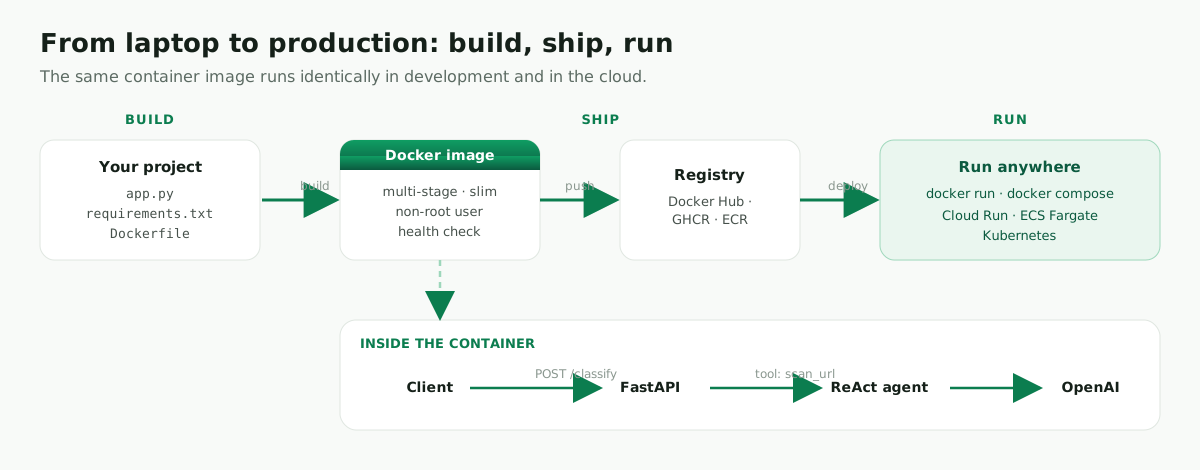
In plain language: the user sends an HTTP request to a FastAPI endpoint. FastAPI passes the text to a small LangGraph ReAct agent. The agent can use a custom tool called scan_url, then returns a verdict. Docker packages the whole application — code, dependencies, and runtime — so it behaves consistently on any machine, from your laptop to a cloud container platform.
Prerequisites
- Docker installed (
docker --version) - An OpenAI API key
- Basic familiarity with Python and the command line
1. The agent service (app.py)
For a demo you could write five lines. But this article is about production, so the code should reflect production habits: it validates input, defines a typed response model, checks the API key before starting, adds logging, sets a model timeout and retries, and never leaks raw exceptions to the caller.
import os
import logging
from fastapi import FastAPI, HTTPException
from pydantic import BaseModel, Field
from langchain_core.tools import tool
from langchain_openai import ChatOpenAI
from langgraph.prebuilt import create_react_agent

logging.basicConfig(level=logging.INFO)
logger = logging.getLogger(__name__)

app = FastAPI(
    title="Email Triage Agent",
    description="A simple AI agent API for classifying suspicious emails.",
    version="1.0.0",
)

class EmailIn(BaseModel):
    text: str = Field(..., min_length=10, description="The email text to classify.")

class ClassificationOut(BaseModel):
    verdict: str

@tool
def scan_url(url: str) -> str:
    """Return phishing or clean for a URL."""
    suspicious_words = ["login-verify", "account-reset", "secure-update"]
    if any(word in url.lower() for word in suspicious_words):
        return "phishing"
    return "clean"

def build_agent():
    api_key = os.getenv("OPENAI_API_KEY")
    if not api_key:
        raise RuntimeError("OPENAI_API_KEY is not configured.")
    model = ChatOpenAI(model="gpt-4o-mini", temperature=0, timeout=30, max_retries=2)
    return create_react_agent(model, tools=[scan_url])

agent = build_agent()

@app.get("/health")
def health():
    return {"status": "ok"}

@app.post("/classify", response_model=ClassificationOut)
def classify(body: EmailIn):
    try:
        logger.info("Classifying email request")
        result = agent.invoke({
            "messages": [("user", f"Classify this email as phishing or clean:\n\n{body.text}")]
        })
        return ClassificationOut(verdict=result["messages"][-1].content)
    except Exception as exc:
        logger.exception("Classification failed")
        raise HTTPException(status_code=500, detail="The email could not be classified.") from exc
Each of those small additions teaches a better habit. EmailIn rejects empty or junk requests before they ever reach the model. Checking OPENAI_API_KEY at startup means the container fails fast and clearly instead of crashing on the first request. The timeout and max_retries stop a slow or flaky API call from hanging a worker. And the try/except returns a clean 500 to the client while logging the full traceback for you.
2. Pin your dependencies (requirements.txt)
fastapi==0.115.*
uvicorn[standard]==0.32.*
langchain==0.3.*
langchain-openai==0.2.*
langgraph==0.2.*
pydantic==2.*
In one sentence each: FastAPI gives us the web API; Uvicorn runs the API server; LangChain and LangGraph provide the agent framework; langchain-openai connects the agent to OpenAI models; Pydantic validates request and response data. Pinning versions means the image you build today builds the same way next month.
3. A secure, multi-stage Dockerfile
# ---- build stage ----
FROM python:3.12-slim AS build
WORKDIR /app
COPY requirements.txt .
RUN pip install --no-cache-dir --prefix=/install -r requirements.txt

# ---- runtime stage ----
FROM python:3.12-slim
ENV PYTHONDONTWRITEBYTECODE=1
ENV PYTHONUNBUFFERED=1
WORKDIR /app
COPY --from=build /install /usr/local
COPY app.py .

RUN useradd -m appuser
USER appuser

EXPOSE 8000
HEALTHCHECK --interval=30s --timeout=3s --retries=3 \
  CMD python -c "import urllib.request; urllib.request.urlopen('http://localhost:8000/health')" || exit 1

CMD ["uvicorn", "app:app", "--host", "0.0.0.0", "--port", "8000"]
Here is what each decision buys you. The build stage installs the Python dependencies; the runtime stage copies only the installed packages and the application code. This keeps the final image smaller and avoids carrying the build toolchain into production. The two ENV lines keep the image clean (no .pyc files) and make logs appear immediately instead of being buffered.
The container runs as appuser instead of root. This is a simple but meaningful security improvement: if something goes wrong inside the container, the process has fewer permissions to abuse. Finally, the health check calls /health every 30 seconds so container platforms can tell whether the application is still alive and restart it if it isn’t.
Now add a .dockerignore — this is where many beginners accidentally leak files into the image:
__pycache__/
*.pyc
*.pyo
*.pyd
.env
.env.*
.git
.gitignore
.pytest_cache/
.mypy_cache/
.venv/
venv/
README.md
The .dockerignore file prevents local files from being copied into the Docker build context. This keeps the image smaller and helps avoid accidentally shipping secrets, virtual environments, cache files, or your entire Git history inside the container.
4. Build and run
Never bake API keys into the image — pass them at runtime. Export the key once, then build and run:
export OPENAI_API_KEY="your_api_key_here"

docker build -t triage-agent:1.0 .

docker run --rm -p 8000:8000 \
  -e OPENAI_API_KEY="$OPENAI_API_KEY" \
  triage-agent:1.0
First, confirm the service is alive:
curl -s localhost:8000/health
# {"status":"ok"}
A normal email should come back clean:
curl -s -X POST localhost:8000/classify \
  -H "Content-Type: application/json" \
  -d '{"text":"Please review the meeting notes from today."}'
{ "verdict": "clean" }
A suspicious one should come back phishing:
curl -s -X POST localhost:8000/classify \
  -H "Content-Type: application/json" \
  -d '{"text":"Verify your account now at http://login-verify.example"}'
{ "verdict": "phishing" }
5. One command with Docker Compose
A single container is easy to run by hand. Compose earns its keep as the project grows — when you later add Redis, Postgres, a background worker, or a monitoring sidecar, each becomes another few lines in the same file. Even for one service, it gives you a clean place to manage environment variables and restart policy:
services:
  agent:
    build: .
    ports:
      - "8000:8000"
    environment:
      OPENAI_API_KEY: ${OPENAI_API_KEY}
    restart: unless-stopped
    healthcheck:
      test: ["CMD", "python", "-c", "import urllib.request; urllib.request.urlopen('http://localhost:8000/health')"]
      interval: 30s
      timeout: 3s
      retries: 3
docker compose up --build

What “production-ready” really means
It’s tempting to treat deployment as a checklist, but each item exists for a reason, so it’s worth understanding them.
In production, secrets should come from environment variables or a secret manager. They should never be committed to Git and never copied into the Docker image — anyone who pulls the image can read what’s inside it.
The container should run as a non-root user. This does not make the application perfectly secure, but it reduces the blast radius if the application is ever compromised.
Every model call should have a timeout. AI APIs can be slow or temporarily unavailable, and without a timeout a single request can hang for far too long and tie up server resources. That’s why app.py sets timeout=30 and max_retries=2.
Logs matter too. At a minimum, log when a request starts, when it fails, and how long it takes. For larger systems, add tracing (for example with LangSmith) so you can see which model calls, tools, or prompts caused a problem.
Finally, pin your versions and set resource limits (--memory, --cpus) so a runaway agent loop can’t exhaust the host.
Common errors and how to fix them
If the container says OPENAI_API_KEY is missing, remember that your host machine and your container do not automatically share environment variables. You must pass the variable with -e when using docker run, or through the environment section when using Docker Compose.
If the image is too large, check whether you copied your virtual environment, cache files, or Git history into it. A good .dockerignore plus a *-slim base image and the multi-stage build above usually solve it.
If the container exits immediately, run docker logs <container-id>. Most startup failures are caused by an import error, a missing package, or a missing environment variable — and because we validate the API key at startup, that case now fails with a clear message instead of a confusing stack trace.
If the port is already in use, map a different host port: -p 8080:8000.
FAQ
Docker vs serverless for agents? Use Docker when you want portability and control. Use a serverless container platform such as Google Cloud Run when you want to run the same container image without managing servers. For many small AI APIs, Cloud Run or AWS ECS Fargate is a natural next step after local Docker testing — you push the image you built here and it scales automatically.
How do I deploy this to the cloud?
Push the image to a registry (docker push) and run it on any container platform — Cloud Run, ECS/Fargate, or Kubernetes. Nothing about app.py changes.
Conclusion
You now have a simple but production-aware pattern for deploying AI agents. The agent is exposed through FastAPI, packaged with Docker, configured through environment variables, checked with a health endpoint, and runnable with a single Docker Compose command.
This same structure scales to much larger agents. You can add more tools, connect a database, introduce background workers, or deploy the image to a cloud container platform — and the core ideas stay the same: keep the application simple, keep secrets outside the image, and make the container predictable.
Leave a comment