

Deploy a Hugging Face Model with FastAPI: Build a Production-Ready ML API in Python
A model in a notebook is useful for experiments. But if another application needs to use it, the model needs an API.
In this tutorial we will take a Hugging Face sentiment-analysis pipeline and serve it with FastAPI. The API will accept text, run the model, and return a clean JSON response. We’ll also add validation, batch prediction, a health endpoint, configurable settings, and a Dockerfile — so the service can run locally or on a cloud container platform.
The deployment pipeline at a glance
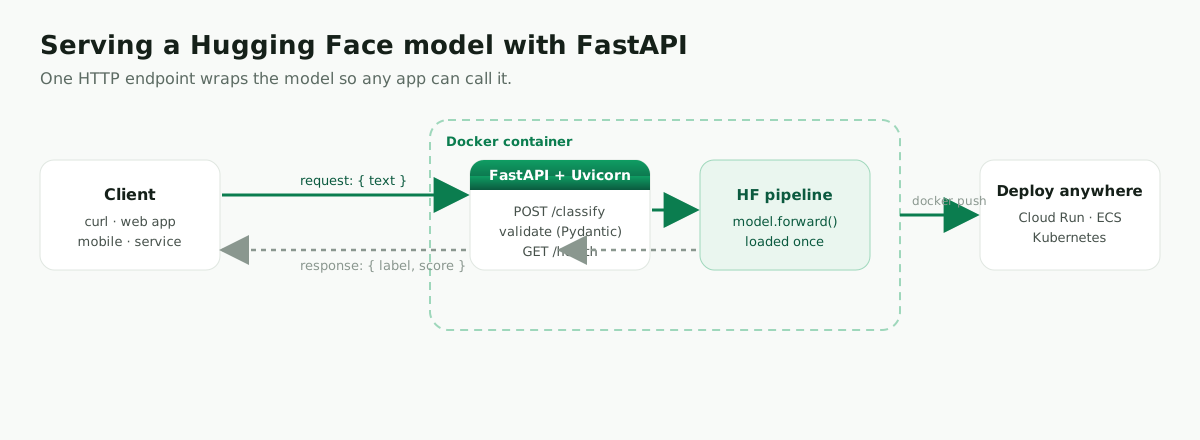
Client → POST /predict → FastAPI (validates with Pydantic) → Hugging Face pipeline → JSON response
What you’ll build
A sentiment-analysis API that loads a Hugging Face model once, exposes /predict and /health endpoints, validates input with Pydantic, returns clean JSON, supports batch prediction, and can run locally or inside Docker.
Prerequisites
- Python 3.10+
- Basic familiarity with the command line (Docker is optional, used near the end)
1. Create the project
mkdir hf-fastapi-sentiment
cd hf-fastapi-sentiment
2. Install dependencies
With uv (a fast, modern Python package & environment manager — recommended):
# install uv once (skip if you already have it)
curl -LsSf https://astral.sh/uv/install.sh | sh        # macOS / Linux
# Windows (PowerShell):  powershell -c "irm https://astral.sh/uv/install.ps1 | iex"

uv venv --python 3.12
source .venv/bin/activate                              # Windows: .venv\Scripts\activate

uv pip install fastapi "uvicorn[standard]" "transformers[torch]" torch pydantic
With plain venv + pip (macOS / Linux):
python -m venv .venv
source .venv/bin/activate
python -m pip install --upgrade pip
python -m pip install fastapi "uvicorn[standard]" "transformers[torch]" torch pydantic
Windows (venv):
python -m venv .venv
.venv\Scripts\activate
python -m pip install --upgrade pip
python -m pip install fastapi "uvicorn[standard]" "transformers[torch]" torch pydantic
Pin them in a requirements.txt so the build is reproducible:
fastapi
uvicorn[standard]
transformers[torch]
torch
pydantic
3. Build the FastAPI app
Create app.py. This is deliberately more than a minimal demo: it validates input, returns a typed response, loads the model once, includes a health endpoint, supports batch prediction, and hides internal errors from the caller.
import logging
from typing import List

from fastapi import FastAPI, HTTPException
from pydantic import BaseModel, Field
from transformers import pipeline

logging.basicConfig(level=logging.INFO)
logger = logging.getLogger(__name__)

MODEL_ID = "distilbert-base-uncased-finetuned-sst-2-english"

app = FastAPI(
    title="Hugging Face Sentiment API",
    description="A simple FastAPI service for Hugging Face text classification.",
    version="1.0.0",
)

# Loaded ONCE at import/startup — never inside an endpoint.
classifier = pipeline(task="sentiment-analysis", model=MODEL_ID)


class PredictionRequest(BaseModel):
    text: str = Field(..., min_length=1, max_length=2000,
                      description="Text to classify.",
                      examples=["I love this product. It works perfectly."])


class PredictionResponse(BaseModel):
    label: str
    score: float


class BatchPredictionRequest(BaseModel):
    texts: List[str] = Field(..., min_length=1, max_length=32,
                             description="A list of texts to classify.")


@app.get("/health")
def health():
    return {"status": "ok", "model": MODEL_ID}


@app.post("/predict", response_model=PredictionResponse)
def predict(request: PredictionRequest):
    try:
        result = classifier(request.text)[0]
        return PredictionResponse(label=result["label"], score=round(float(result["score"]), 4))
    except Exception as exc:
        logger.exception("Prediction failed")
        raise HTTPException(status_code=500, detail="Prediction failed.") from exc


@app.post("/predict-batch", response_model=List[PredictionResponse])
def predict_batch(request: BatchPredictionRequest):
    try:
        results = classifier(request.texts)
        return [PredictionResponse(label=item["label"], score=round(float(item["score"]), 4))
                for item in results]
    except Exception as exc:
        logger.exception("Batch prediction failed")
        raise HTTPException(status_code=500, detail="Batch prediction failed.") from exc
Why load the model at startup?
The model is loaded once when the application starts. This is important: do not create the pipeline inside the /predict endpoint, because that would reload the model on every request and make the API extremely slow. Loading it at import time means each request reuses the model already in memory.
Why Pydantic validation?
PredictionRequest and PredictionResponse are Pydantic models built on Python type hints. They reject empty or oversized input before it reaches the model, and they guarantee the response shape — which also powers the automatic docs you’ll see shortly.
4. Test the API locally
Run it with Uvicorn:
uvicorn app:app --reload
Uvicorn is the ASGI server that runs the application: FastAPI defines the API, Uvicorn serves it over HTTP. (--reload is for development only — remove it in production.)
Check health:
curl http://127.0.0.1:8000/health
{ "status": "ok", "model": "distilbert-base-uncased-finetuned-sst-2-english" }
Single prediction:
curl -X POST "http://127.0.0.1:8000/predict" \
  -H "Content-Type: application/json" \
  -d '{"text": "This tutorial is clear and useful."}'
{ "label": "POSITIVE", "score": 0.9998 }
Batch prediction:
curl -X POST "http://127.0.0.1:8000/predict-batch" \
  -H "Content-Type: application/json" \
  -d '{"texts": ["Great experience.", "This was terrible.", "It was okay."]}'
[
  { "label": "POSITIVE", "score": 0.9999 },
  { "label": "NEGATIVE", "score": 0.9997 },
  { "label": "POSITIVE", "score": 0.7150 }
]
Free interactive docs
Open http://127.0.0.1:8000/docs in your browser. FastAPI automatically generates interactive documentation from your endpoint definitions and Pydantic models — you can try the API right from the page. This is one of the biggest advantages of using FastAPI for ML services.
5. Make settings configurable
Don’t hardcode every setting. Create config.py:
import os

MODEL_ID = os.getenv("MODEL_ID", "distilbert-base-uncased-finetuned-sst-2-english")
MAX_BATCH_SIZE = int(os.getenv("MAX_BATCH_SIZE", "32"))
Then use it in app.py:
from config import MODEL_ID, MAX_BATCH_SIZE
Now you can point the API at a different model — including your own fine-tuned model — without changing code: export MODEL_ID="your-username/your-model".
6. Add a Dockerfile
FROM python:3.12-slim

ENV PYTHONDONTWRITEBYTECODE=1
ENV PYTHONUNBUFFERED=1

WORKDIR /app

COPY requirements.txt .
RUN pip install --no-cache-dir -r requirements.txt

COPY app.py .
COPY config.py .

EXPOSE 8000
CMD ["uvicorn", "app:app", "--host", "0.0.0.0", "--port", "8000"]
Add a .dockerignore so caches and secrets never enter the image:
__pycache__/
*.pyc
.venv/
.env
.git/
.pytest_cache/
.mypy_cache/
For a hardened, multi-stage build with a non-root user and a health check, see Deploy AI agents to production with Docker.
7. Run with Docker
docker build -t hf-sentiment-api:1.0 .
docker run --rm -p 8000:8000 hf-sentiment-api:1.0
curl -X POST "http://127.0.0.1:8000/predict" \
  -H "Content-Type: application/json" \
  -d '{"text": "Docker makes deployment easier."}'
Once the API is containerized, deployment becomes much easier: the same image can run on Google Cloud Run, AWS ECS/Fargate, Kubernetes, or Hugging Face Spaces.
8. Production checklist
For local development, uvicorn app:app --reload is convenient. For production, do not use --reload. Beyond that:
- Load the model once (done) and batch requests where possible for throughput.
- Add authentication and rate limiting so the API isn’t abused.
- Add structured logs and monitoring; track latency and error rate.
- Pre-download the model during the Docker build (or mount an
HF_HOMEcache) so cold starts are fast and don’t depend on network at startup. - Set resource limits (
--memory,--cpus) and run multiple workers or replicas behind a load balancer.
Common errors
If the first request is slow, that’s normal — the model may be downloading and loading into memory.
If the container is very large, use a slim Python image and avoid copying virtual environments or cache folders into the image (that’s what .dockerignore is for).
If the API is slow under load, batch requests where possible and make sure the model is loaded once at startup, not per request.
If Docker can’t find uvicorn, check that uvicorn[standard] is in requirements.txt.
If the model fails to download in production, pre-download it during the Docker build or use a platform with network access at startup.
FAQ
FastAPI vs Flask? Flask is simple and mature. FastAPI is usually a better fit for ML services because it gives you typed request validation, automatic OpenAPI docs, and strong async support.
Can I use my own fine-tuned model?
Yes. Set MODEL_ID to the local path or Hugging Face Hub ID of your model (see fine-tuning Llama 3 with Unsloth or DistilBERT text classification).
Should I load the model inside the endpoint? No. Load it once when the app starts — loading it inside the endpoint makes every request slow.
Where do I deploy this? Any container platform works. Good options include Google Cloud Run, AWS ECS/Fargate, Kubernetes, and Hugging Face Spaces with Docker.
Is this production-ready? It’s a strong starting point. For production add authentication, rate limiting, logging, monitoring, batching, model versioning, and resource limits.
Conclusion
You now have a complete path from a Hugging Face model to a working API. The model is loaded once, FastAPI validates the request, the pipeline runs inference, and the service returns clean JSON.
This is the pattern you can reuse for many ML services: start with a simple local API, test it with curl and /docs, then containerize it when you’re ready to deploy.
Leave a comment