
Fine-tune Llama 3 with Unsloth: LoRA, Alpaca, Inference, and GGUF Export
Fine-tuning a large language model used to sound like something only big labs could do. Today, with LoRA, QLoRA, and tools like Unsloth, you can fine-tune a useful instruction model on a single Colab GPU.
In this tutorial we will fine-tune a Llama 3 model on the Alpaca instruction dataset. The goal is not to create the smartest model in the world — it’s to understand the complete workflow: load a model, prepare instruction data, train LoRA adapters, test the model, save it, and optionally export it to GGUF for local inference with Ollama, llama.cpp, LM Studio, Jan, or Open WebUI.
1. The pipeline at a glance
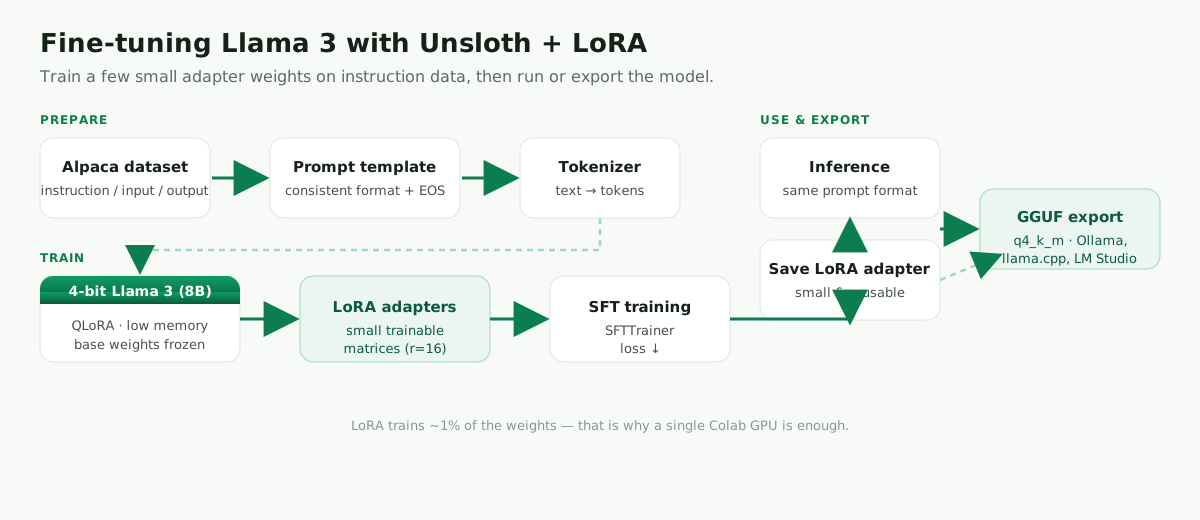
The base model already understands language. Fine-tuning teaches it a style, format, or task. LoRA makes this practical by training a small number of adapter weights instead of updating the entire model.
2. What you’ll build
A small instruction-following Llama model fine-tuned on the Alpaca dataset using Unsloth and LoRA. You’ll finish with a trained LoRA adapter, a working inference example, and an optional GGUF export for local use.
3. Why Unsloth instead of a normal Trainer script?
A normal Hugging Face Trainer workflow is great for smaller models such as DistilBERT (see Fine-tune a transformer for text classification). For LLM fine-tuning, memory becomes the main problem.
Unsloth is designed for exactly this situation: optimized model loading, 4-bit (QLoRA) training, LoRA support, faster training, and export options for local inference. LoRA trains small added matrices while keeping the base weights mostly frozen; QLoRA combines LoRA with 4-bit quantization to cut memory use further. If you’re new to this, start with a smaller instruct model and QLoRA.
4. Prerequisites
- A GPU runtime — Google Colab (free T4) works well, or a local NVIDIA GPU.
- Basic Python and a Hugging Face account (for gated models / pushing to the Hub).
5. Install Unsloth
On Google Colab (the easiest start):
%%capture
!pip install unsloth
!pip install --upgrade --no-deps trl peft accelerate bitsandbytes
Locally with uv (a fast, modern Python package & environment manager — recommended):
# install uv once
curl -LsSf https://astral.sh/uv/install.sh | sh          # macOS / Linux
# Windows (PowerShell):  powershell -c "irm https://astral.sh/uv/install.ps1 | iex"

# create and activate an isolated environment
uv venv --python 3.11
source .venv/bin/activate                                # Windows: .venv\Scripts\activate

# install Unsloth + training deps
uv pip install unsloth
uv pip install --upgrade --no-deps trl peft accelerate bitsandbytes
Locally with plain venv + pip (if you prefer):
python -m venv .venv
source .venv/bin/activate
python -m pip install --upgrade pip
python -m pip install unsloth
python -m pip install --upgrade --no-deps trl peft accelerate bitsandbytes
Check your GPU
import torch

print("PyTorch:", torch.__version__)
print("CUDA available:", torch.cuda.is_available())
if torch.cuda.is_available():
    print("GPU:", torch.cuda.get_device_name(0))
6. Load a 4-bit Llama model
from unsloth import FastLanguageModel
import torch

max_seq_length = 2048
dtype = None            # auto-detect (bf16 on newer GPUs, fp16 otherwise)
load_in_4bit = True

model_name = "unsloth/llama-3-8b-bnb-4bit"

model, tokenizer = FastLanguageModel.from_pretrained(
    model_name=model_name,
    max_seq_length=max_seq_length,
    dtype=dtype,
    load_in_4bit=load_in_4bit,
)
We load a 4-bit version of Llama 3 to reduce memory usage, which makes the tutorial practical on a Colab GPU. max_seq_length controls how much text the model can see during training.
7. Add LoRA adapters
model = FastLanguageModel.get_peft_model(
    model,
    r=16,
    target_modules=[
        "q_proj", "k_proj", "v_proj", "o_proj",
        "gate_proj", "up_proj", "down_proj",
    ],
    lora_alpha=16,
    lora_dropout=0,
    bias="none",
    use_gradient_checkpointing="unsloth",
    random_state=42,
)
LoRA adds small trainable matrices to selected parts of the model. The base model stays mostly frozen and we train only the adapter weights — that’s why fine-tuning becomes much cheaper than full fine-tuning.
8. Load and format the Alpaca dataset
from datasets import load_dataset

dataset = load_dataset("yahma/alpaca-cleaned", split="train")
print(dataset[0])
Instruction fine-tuning is not just “throw data into a model.” The model needs a consistent prompt format, and you must use the same format at inference time.
alpaca_prompt = """Below is an instruction that describes a task, paired with an input that provides more context. Write a response that completes the request.

### Instruction:
{}

### Input:
{}

### Response:
{}"""

EOS_TOKEN = tokenizer.eos_token

def formatting_prompts_func(examples):
    instructions = examples["instruction"]
    inputs = examples["input"]
    outputs = examples["output"]
    texts = []
    for instruction, input_text, output in zip(instructions, inputs, outputs):
        text = alpaca_prompt.format(instruction, input_text, output) + EOS_TOKEN
        texts.append(text)
    return {"text": texts}

dataset = dataset.map(formatting_prompts_func, batched=True)
print(dataset[0]["text"])
The trailing EOS_TOKEN matters — it teaches the model where a response ends, so generation stops cleanly.
9. Train with supervised fine-tuning
from trl import SFTTrainer
from transformers import TrainingArguments

trainer = SFTTrainer(
    model=model,
    tokenizer=tokenizer,
    train_dataset=dataset,
    dataset_text_field="text",
    max_seq_length=max_seq_length,
    dataset_num_proc=2,
    packing=False,
    args=TrainingArguments(
        per_device_train_batch_size=2,
        gradient_accumulation_steps=4,
        warmup_steps=5,
        max_steps=60,
        learning_rate=2e-4,
        fp16=not torch.cuda.is_bf16_supported(),
        bf16=torch.cuda.is_bf16_supported(),
        logging_steps=1,
        optim="adamw_8bit",
        weight_decay=0.01,
        lr_scheduler_type="linear",
        seed=42,
        output_dir="outputs",
    ),
)

trainer_stats = trainer.train()
This tutorial uses max_steps=60 so the run finishes in a few minutes. For a real fine-tune you’d train longer, use a validation set, evaluate outputs, and tune the learning rate, batch size, and number of epochs.
10. Run inference
FastLanguageModel.for_inference(model)   # enable Unsloth's fast inference

prompt = alpaca_prompt.format(
    "Write a short professional email asking for a meeting.",
    "",   # input
    "",   # leave the response empty for the model to complete
)

inputs = tokenizer([prompt], return_tensors="pt").to("cuda")
outputs = model.generate(**inputs, max_new_tokens=128, use_cache=True)
print(tokenizer.batch_decode(outputs, skip_special_tokens=True)[0])
After training, we switch the model into inference mode. We use the same Alpaca prompt format, but leave the response empty so the model completes it.
11. Save the LoRA adapter
model.save_pretrained("llama3-alpaca-lora")
tokenizer.save_pretrained("llama3-alpaca-lora")
This saves the LoRA adapter, not a full copy of the base model — so the output stays small. Later you can load the base model and apply this adapter. To share it:
# model.push_to_hub("your-username/llama3-alpaca-lora")
# tokenizer.push_to_hub("your-username/llama3-alpaca-lora")
12. Merge or export the model
The adapter is great for reuse, but some runtimes want a single self-contained model. Unsloth can merge LoRA into the base weights (e.g. model.save_pretrained_merged(...)) — or, more commonly for local use, export straight to GGUF.
13. Export to GGUF
model.save_pretrained_gguf(
    "llama3-alpaca-gguf",
    tokenizer,
    quantization_method="q4_k_m",
)
GGUF is the format used by local runtimes such as Ollama, llama.cpp, LM Studio, Jan, and Open WebUI. The q4_k_m option is a common practical choice — it keeps the file smaller while preserving useful quality (other options include q8_0 and f16).
⚠️ Use the same prompt / chat template at inference that you used during training. If the model works in the notebook but produces strange output in Ollama or llama.cpp, the cause is almost always a template or EOS-token mismatch (an extra or missing start token, or the wrong chat template).
14. Common errors
CUDA out of memory — use a smaller model, reduce max_seq_length, reduce per_device_train_batch_size, or keep load_in_4bit=True.
Training is slow — make sure you’re on a GPU runtime. In Colab: Runtime → Change runtime type → GPU.
Model saves but the exported GGUF behaves badly — use the same prompt template at inference that you used during training, and check the EOS token.
Import errors after installing — restart the runtime. Colab often needs a restart after low-level package changes.
Results look weak — the demo uses a short run. Increase max_steps, improve and clean your dataset, and evaluate on realistic prompts.
15. FAQ
Is this better than the DistilBERT tutorial? It teaches a different thing. DistilBERT is good for text classification; Unsloth is better for fine-tuning instruction-following LLMs.
Do I need a GPU? For LLM fine-tuning, yes — a GPU is strongly recommended. The tutorial is built around Colab-style GPU training.
What’s the difference between LoRA and QLoRA? LoRA trains small adapter weights. QLoRA also loads the base model in 4-bit precision to reduce memory use.
Can I use my own dataset? Yes. Convert it into a consistent instruction / input / output format and reuse the same prompt template.
Should I train a base model or an instruct model? For beginners, prefer an instruct model — it already understands chat-style behavior, so it’s easier to adapt.
Conclusion
You have now fine-tuned a Llama model with Unsloth, trained LoRA adapters, tested the model, saved the adapter, and optionally exported the result to GGUF — the complete path from experiment to local inference.
The most important lesson is that fine-tuning is not only about running training code. A good fine-tune depends on the right base model, clean instruction data, a consistent prompt template, careful training settings, and reliable inference after export.
Leave a comment