

Fine-tune a Transformer for Text Classification with Hugging Face (DistilBERT)
Pretrained transformer models already understand a lot about language — grammar, sentence structure, and many general patterns learned from huge text corpora. But they do not automatically know your labels.
Fine-tuning is the step where we teach a pretrained model a specific task. In this tutorial we’ll fine-tune DistilBERT to classify movie reviews as positive or negative. The same workflow reuses for support tickets, emails, product reviews, intent routing, spam detection, and many other labeled-text problems.
We’ll start from a pretrained model, prepare the IMDb dataset, tokenize the text, train with the Hugging Face Trainer, evaluate with accuracy and F1, and save the model so it can be reused later with a simple pipeline.
Looking to fine-tune a generative LLM instead of a classifier? See Fine-tune Llama 3 with Unsloth (LoRA + GGUF).
The pipeline at a glance
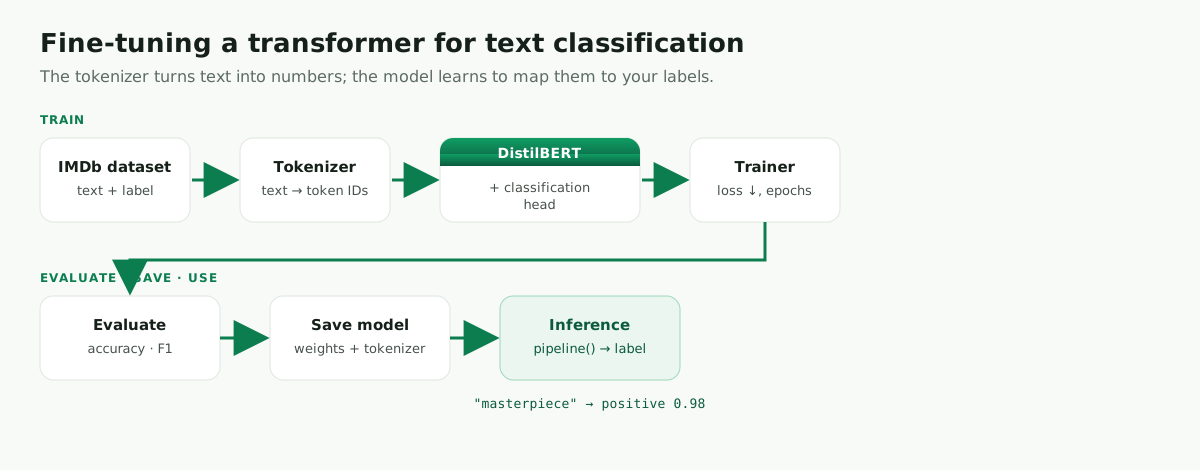
In simple terms: the tokenizer converts text into numbers, the pretrained model reads those numbers and produces useful representations, and the classification head learns to map those representations to labels such as negative and positive.
What you’ll build
A sentiment classifier trained on movie reviews. It receives text like “An absolute masterpiece — I was hooked the whole time.” and returns:
[{'label': 'positive', 'score': 0.98}]
We use IMDb because it’s a clean, well-known binary sentiment dataset (25,000 labeled train + 25,000 test reviews). The same code pattern works for many other classification tasks, as long as your dataset has text and labels.
Prerequisites
Python 3.10+. A GPU helps but isn’t required for the small demo — on CPU, keep the dataset slice small.
Create a clean project folder:
mkdir distilbert-text-classification
cd distilbert-text-classification
Set up an isolated environment. With uv (a fast, modern package manager — recommended):
curl -LsSf https://astral.sh/uv/install.sh | sh        # macOS / Linux
# Windows (PowerShell):  powershell -c "irm https://astral.sh/uv/install.ps1 | iex"
uv venv --python 3.12
source .venv/bin/activate                              # Windows: .venv\Scripts\activate
uv pip install -U "transformers[torch]" datasets evaluate scikit-learn accelerate
Or with plain venv + pip:
python -m venv .venv
source .venv/bin/activate                              # Windows: .venv\Scripts\activate
python -m pip install --upgrade pip
python -m pip install -U "transformers[torch]" datasets evaluate scikit-learn accelerate
Pin the dependencies in requirements.txt:
transformers[torch]
datasets
evaluate
scikit-learn
accelerate
torch
numpy
Check the environment works:
import torch, transformers, datasets, evaluate
print("PyTorch:", torch.__version__)
print("Transformers:", transformers.__version__)
print("GPU available:", torch.cuda.is_available())
if torch.cuda.is_available():
    print("GPU:", torch.cuda.get_device_name(0))
Project structure
distilbert-text-classification/
├── train.py          # trains and saves the model
├── predict.py        # loads the saved model and runs inference
├── requirements.txt
└── distilbert-imdb/  # created by training
Step 1 — Load the IMDb dataset
from datasets import load_dataset

dataset = load_dataset("imdb")
print(dataset)
print(dataset["train"][0])
Each row has a review and a label (0 = negative, 1 = positive). For a fast tutorial we use a small slice — remove it to train on the full dataset:
dataset["train"] = dataset["train"].shuffle(seed=42).select(range(2000))
dataset["test"]  = dataset["test"].shuffle(seed=42).select(range(1000))
Step 2 — Define human-readable labels
A polished model should return negative/positive, not LABEL_0/LABEL_1. Define the mappings up front:
id2label = {0: "negative", 1: "positive"}
label2id = {"negative": 0, "positive": 1}
Step 3 — Load the tokenizer and tokenize
A transformer reads token IDs, not raw text:
from transformers import AutoTokenizer

model_id = "distilbert-base-uncased"
tokenizer = AutoTokenizer.from_pretrained(model_id)

def tokenize_batch(batch):
    return tokenizer(batch["text"], truncation=True, max_length=256)

tokenized_dataset = dataset.map(tokenize_batch, batched=True)
Why max_length=256? Reviews can be long; a smaller maximum trains faster and uses less memory. For a more serious run try 512 (more memory).
Step 4 — Load the pretrained model
from transformers import AutoModelForSequenceClassification

model = AutoModelForSequenceClassification.from_pretrained(
    model_id, num_labels=2, id2label=id2label, label2id=label2id,
)
DistilBERT is a great tutorial model — smaller and faster than BERT, still strong for classification. The classification head is randomly initialized (you’ll see a warning — that’s normal; fine-tuning trains it).
Step 5 — Define evaluation metrics
Accuracy is intuitive, but F1 is more informative when classes are imbalanced — report both.
import numpy as np, evaluate

accuracy_metric = evaluate.load("accuracy")
f1_metric = evaluate.load("f1")

def compute_metrics(eval_pred):
    logits, labels = eval_pred
    predictions = np.argmax(logits, axis=-1)
    accuracy = accuracy_metric.compute(predictions=predictions, references=labels)["accuracy"]
    f1 = f1_metric.compute(predictions=predictions, references=labels, average="macro")["f1"]
    return {"accuracy": accuracy, "f1": f1}
Step 6 — Configure training
from transformers import TrainingArguments

training_args = TrainingArguments(
    output_dir="distilbert-imdb",
    eval_strategy="epoch",
    save_strategy="epoch",
    learning_rate=2e-5,
    per_device_train_batch_size=16,
    per_device_eval_batch_size=16,
    num_train_epochs=2,
    weight_decay=0.01,
    logging_steps=50,
    load_best_model_at_end=True,
    metric_for_best_model="f1",
    report_to="none",
)
If your Transformers version doesn’t recognize eval_strategy, use the older name evaluation_strategy="epoch".
Step 7 — Create the Trainer
A data collator pads each batch dynamically (better than padding everything to a fixed length up front):
from transformers import Trainer, DataCollatorWithPadding

data_collator = DataCollatorWithPadding(tokenizer=tokenizer)

trainer = Trainer(
    model=model,
    args=training_args,
    train_dataset=tokenized_dataset["train"],
    eval_dataset=tokenized_dataset["test"],
    processing_class=tokenizer,   # older versions: tokenizer=tokenizer
    data_collator=data_collator,
    compute_metrics=compute_metrics,
)
Step 8 — Train and evaluate
trainer.train()
print(trainer.evaluate())
Expected (varies by hardware/versions/slice):
{'eval_loss': 0.28, 'eval_accuracy': 0.90, 'eval_f1': 0.90, 'epoch': 2.0}
The key lesson: even on a small subset, a pretrained transformer learns the task quickly.
Step 9 — Save the model
trainer.save_model("distilbert-imdb")
tokenizer.save_pretrained("distilbert-imdb")
The folder now holds the weights, tokenizer, and config — reuse it later without retraining.
The complete train.py
import numpy as np
import evaluate
from datasets import load_dataset
from transformers import (
    AutoTokenizer, AutoModelForSequenceClassification,
    DataCollatorWithPadding, Trainer, TrainingArguments,
)

MODEL_ID = "distilbert-base-uncased"
OUTPUT_DIR = "distilbert-imdb"


def main():
    id2label = {0: "negative", 1: "positive"}
    label2id = {"negative": 0, "positive": 1}

    dataset = load_dataset("imdb")
    # Keep the tutorial fast. Remove these two lines for the full dataset.
    dataset["train"] = dataset["train"].shuffle(seed=42).select(range(2000))
    dataset["test"]  = dataset["test"].shuffle(seed=42).select(range(1000))

    tokenizer = AutoTokenizer.from_pretrained(MODEL_ID)

    def tokenize_batch(batch):
        return tokenizer(batch["text"], truncation=True, max_length=256)

    tokenized = dataset.map(tokenize_batch, batched=True)

    model = AutoModelForSequenceClassification.from_pretrained(
        MODEL_ID, num_labels=2, id2label=id2label, label2id=label2id,
    )

    accuracy_metric = evaluate.load("accuracy")
    f1_metric = evaluate.load("f1")

    def compute_metrics(eval_pred):
        logits, labels = eval_pred
        preds = np.argmax(logits, axis=-1)
        return {
            "accuracy": accuracy_metric.compute(predictions=preds, references=labels)["accuracy"],
            "f1": f1_metric.compute(predictions=preds, references=labels, average="macro")["f1"],
        }

    args = TrainingArguments(
        output_dir=OUTPUT_DIR, eval_strategy="epoch", save_strategy="epoch",
        learning_rate=2e-5, per_device_train_batch_size=16, per_device_eval_batch_size=16,
        num_train_epochs=2, weight_decay=0.01, logging_steps=50,
        load_best_model_at_end=True, metric_for_best_model="f1", report_to="none",
    )

    trainer = Trainer(
        model=model, args=args,
        train_dataset=tokenized["train"], eval_dataset=tokenized["test"],
        processing_class=tokenizer,
        data_collator=DataCollatorWithPadding(tokenizer=tokenizer),
        compute_metrics=compute_metrics,
    )

    trainer.train()
    print(trainer.evaluate())
    trainer.save_model(OUTPUT_DIR)
    tokenizer.save_pretrained(OUTPUT_DIR)


if __name__ == "__main__":
    main()
python train.py
Step 10 — Run inference (predict.py)
from transformers import pipeline

classifier = pipeline("text-classification", model="distilbert-imdb", tokenizer="distilbert-imdb")

examples = [
    "An absolute masterpiece — I was hooked the whole time.",
    "The movie was painfully slow and badly written.",
    "It was okay, but I would not watch it again.",
]

for text in examples:
    r = classifier(text)[0]
    print("Text:", text)
    print("Prediction:", r["label"], "| Score:", round(r["score"], 4))
    print()
Expected output (numbers vary):
Text: An absolute masterpiece — I was hooked the whole time.
Prediction: positive | Score: 0.98

Text: The movie was painfully slow and badly written.
Prediction: negative | Score: 0.99

Text: It was okay, but I would not watch it again.
Prediction: negative | Score: 0.71
Batch inference
texts = ["I loved every minute of this film.", "The acting was terrible.", "Predictable but enjoyable."]
for text, r in zip(texts, classifier(texts)):
    print(f"{text} => {r['label']} ({r['score']:.4f})")
Step 11 — Use your own dataset (CSV)
For a real project your data might be a CSV:
text,label
"The app crashes every time I upload a file.",technical
"I was charged twice for my subscription.",billing
"Can I get a demo for my team?",sales
Load it and turn string labels into integer IDs:
from datasets import load_dataset

dataset = load_dataset("csv", data_files={"train": "train.csv", "test": "test.csv"})

label_names = sorted(set(dataset["train"]["label"]))
label2id = {label: i for i, label in enumerate(label_names)}
id2label = {i: label for label, i in label2id.items()}

def encode_labels(batch):
    batch["label"] = label2id[batch["label"]]
    return batch

dataset = dataset.map(encode_labels)
num_labels = len(label_names)

model = AutoModelForSequenceClassification.from_pretrained(
    MODEL_ID, num_labels=num_labels, id2label=id2label, label2id=label2id,
)
This is what makes the tutorial useful beyond IMDb — multi-class works the same way.
Common errors
CUDA out of memory — reduce per_device_train_batch_size=8, lower max_length=128, or add gradient_accumulation_steps=2.
eval_strategy not recognized — use evaluation_strategy="epoch", or upgrade: pip install -U transformers.
Model returns LABEL_0/LABEL_1 — set id2label and label2id when loading the model.
Loss not decreasing — ensure labels are integers 0..num_labels-1 and num_labels matches your class count.
Training is very slow — use a smaller slice for testing and confirm a GPU is available (torch.cuda.is_available()).
FAQ
Which base model should I use?
distilbert-base-uncased is a strong, fast default for English. For higher accuracy try roberta-base; for many languages use xlm-roberta-base.
How much data do I need? A few hundred high-quality examples per class can be enough for a first model. Clean labels usually matter more than sheer volume.
Why F1 if I already have accuracy? Accuracy can look good while a model fails on a minority class; F1 reveals that.
Can I use more than two labels?
Yes — set num_labels and provide the correct id2label/label2id.
Can I deploy this model?
Yes — load the saved folder with pipeline() inside a FastAPI service. See Deploy a Hugging Face model with FastAPI.
Conclusion
Fine-tuning is the bridge between a general pretrained model and a useful task-specific one. You fine-tuned DistilBERT on IMDb, evaluated with accuracy and F1, saved it, and reused it for inference. The workflow is simple but powerful:
load dataset → tokenize → load pretrained model → train → evaluate → save → predict
Once you understand this pattern, replace IMDb with your own labeled data and build classifiers for support tickets, customer feedback, emails, product reviews, intent routing, and more.
Leave a comment