

Hugging Face Pipelines Tutorial: Build Text, Vision, and Classification Prototypes in Python
When you have an AI idea, you do not always want to fine-tune a model, build a training dataset, or write low-level tokenizer code. Sometimes you just want to test whether the idea works.
That is where Hugging Face pipelines are useful. A pipeline lets you run a pretrained model with one Python function — it handles the tokenizer, model inference, and output formatting for you.
In this tutorial we will use pipelines for sentiment analysis, zero-shot classification, named entity recognition, summarization, and image captioning. We will start with one-line examples, then move toward cleaner code you can reuse in real prototypes — and finish with a small support-ticket classifier and a path to production.
What a pipeline does
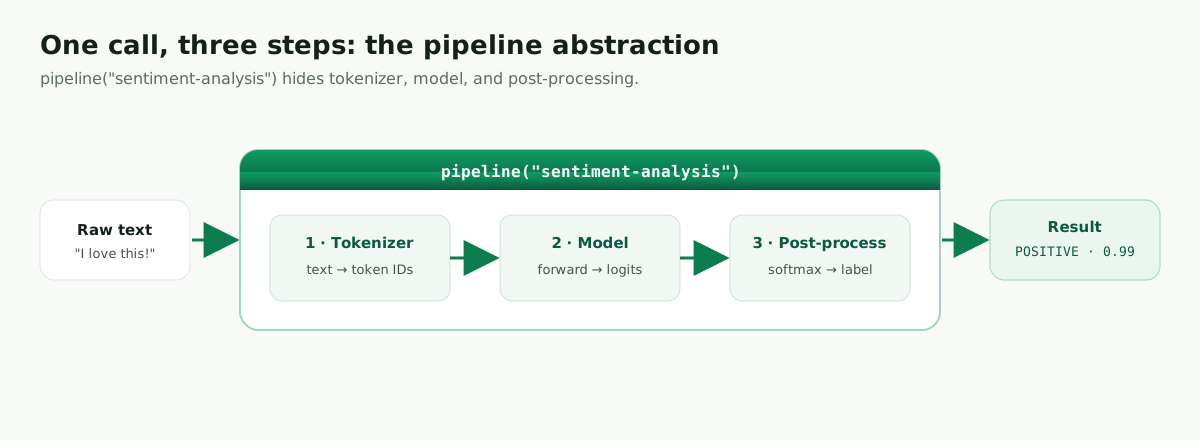
A pipeline is a high-level wrapper around a machine-learning model.
Normally, using a transformer requires several steps: you load a tokenizer, convert text into tokens, pass those tokens to the model, decode the output, and format the result. A pipeline does all of those steps for you. That makes pipelines ideal for early experiments, demos, notebooks, and internal prototypes.
Installation
Work inside a virtual environment so your experiments stay isolated.
macOS / Linux
python -m venv .venv
source .venv/bin/activate

python -m pip install --upgrade pip
python -m pip install -U "transformers[torch]"
Windows
python -m venv .venv
.venv\Scripts\activate

python -m pip install --upgrade pip
python -m pip install -U "transformers[torch]"
Check your environment
Before running the examples, confirm your setup. GPU acceleration depends on having a matching PyTorch/CUDA install — but everything in this tutorial also runs fine on CPU.
import transformers
import torch

print("Transformers:", transformers.__version__)
print("PyTorch:", torch.__version__)
print("GPU available:", torch.cuda.is_available())
Sentiment analysis in one line
The first time you run this, Hugging Face downloads the default sentiment model and stores it in a local cache. Later runs are faster because the model is already on your machine.
from transformers import pipeline

sentiment = pipeline("sentiment-analysis")

result = sentiment("I love how simple this is!")
print(result)
Output:
[{'label': 'POSITIVE', 'score': 0.9998}]
The label is the model’s prediction; the score is its confidence. For a prototype, that’s often enough to decide whether the idea is worth developing further.
Zero-shot classification with custom labels
This is where beginners get excited: zero-shot classification lets you use your own labels without training a custom model.
from transformers import pipeline

classifier = pipeline("zero-shot-classification")

text = "My invoice total is wrong and I want a refund."
labels = ["billing", "technical support", "sales", "spam"]

result = classifier(text, candidate_labels=labels)

print("Best label:", result["labels"][0])
print("Score:", round(result["scores"][0], 3))
Output:
Best label: billing
Score: 0.972
This is useful when you want to test a routing idea — for example, classifying support tickets into billing, technical support, sales, or spam without building a training dataset first.
Named entity recognition
Named entity recognition (NER) finds people, locations, organizations, and similar entities in text. Use aggregation_strategy="simple" to group word-pieces into whole entities (the older grouped_entities=True argument is deprecated).
from transformers import pipeline

ner = pipeline("ner", aggregation_strategy="simple")

text = "Ruslan works on AI projects in Genoa, Italy."

for entity in ner(text):
    print(entity["entity_group"], entity["word"], round(entity["score"], 3))
Output (may vary by model):
PER Ruslan 0.998
LOC Genoa 0.999
LOC Italy 0.999
NER is handy for document processing, CRM enrichment, search indexing, and compliance workflows.
Summarization
Summarization condenses long text. Here’s a small, working example:
from transformers import pipeline

summarizer = pipeline("summarization")

article = """
Hugging Face pipelines make it easy to test machine learning models without
writing low-level inference code. A pipeline downloads a pretrained model,
prepares the input, runs the model, and formats the output. This is useful
for prototypes, demos, and internal tools where speed matters more than
custom training.
"""

summary = summarizer(article, max_length=45, min_length=15, do_sample=False)
print(summary[0]["summary_text"])
For long documents, do not send the entire file at once — most summarization models have an input-length limit. A practical system splits the document into chunks, summarizes each chunk, then summarizes the summaries.
def chunk_text(text: str, max_words: int = 120):
    words = text.split()
    for i in range(0, len(words), max_words):
        yield " ".join(words[i:i + max_words])


long_text = article * 10
summaries = []

for chunk in chunk_text(long_text):
    result = summarizer(chunk, max_length=45, min_length=15, do_sample=False)
    summaries.append(result[0]["summary_text"])

final_summary = " ".join(summaries)
print(final_summary)
Image captioning (pipelines aren’t only NLP)
Pipelines also cover vision, audio, and multimodal tasks. The pattern is identical — choose a task, create a pipeline, pass input, read output:
from transformers import pipeline

captioner = pipeline("image-to-text", model="Salesforce/blip-image-captioning-base")

result = captioner("https://images.unsplash.com/photo-1518770660439-4636190af475")
print(result[0]["generated_text"])
Here the input is an image URL instead of a sentence, but the code still follows the same idea.
Batching and choosing a model
Defaults are great for exploration. When you need a specific model or higher throughput, name the model and pass a list of inputs. Detect the device so the same code runs on a laptop CPU or a GPU machine (pipelines also support accelerators like Apple Silicon).
import torch
from transformers import pipeline

device = 0 if torch.cuda.is_available() else -1

sentiment = pipeline(
    "sentiment-analysis",
    model="distilbert-base-uncased-finetuned-sst-2-english",
    device=device,
)

texts = ["Great support!", "Worst experience ever.", "It was fine."]
for text, result in zip(texts, sentiment(texts)):
    print(text, "=>", result["label"], round(result["score"], 3))
Great support! => POSITIVE 0.999
Worst experience ever. => NEGATIVE 0.999
It was fine. => POSITIVE 0.715
Mini-project: classify customer support messages
Let’s turn the zero-shot classifier into something you could actually show a team — a tiny support-ticket router.
from transformers import pipeline

classifier = pipeline("zero-shot-classification")

tickets = [
    "I was charged twice for my subscription.",
    "The app crashes every time I upload a file.",
    "Can I get a demo for my team?",
    "Congratulations, you won a free prize. Click this link.",
]
candidate_labels = ["billing", "technical support", "sales", "spam"]

for ticket in tickets:
    result = classifier(ticket, candidate_labels=candidate_labels)
    label = result["labels"][0]
    score = result["scores"][0]
    print(f"Ticket: {ticket}")
    print(f"Route: {label} ({score:.3f})")
    print()
Output:
Ticket: I was charged twice for my subscription.
Route: billing (0.94)

Ticket: The app crashes every time I upload a file.
Route: technical support (0.91)

Ticket: Can I get a demo for my team?
Route: sales (0.88)

Ticket: Congratulations, you won a free prize. Click this link.
Route: spam (0.86)
This is a realistic prototype. You could show it to a team before building a full classifier. If the labels are useful and the results look promising, the next step is evaluation on real support tickets.
From prototype to product
Pipelines are excellent for prototyping, but production needs more care.
First, choose the model intentionally. The default is convenient, but a real product should use a model that matches the language, domain, latency, and accuracy requirements of the application.
Second, measure accuracy on your own examples. A model that works on demo text may fail on your company’s real tickets, documents, or customer messages.
Third, load the pipeline once when your application starts — never inside every request, because model loading is expensive.
Finally, wrap the pipeline in an API when other systems need it. FastAPI is a common choice:
from fastapi import FastAPI
from pydantic import BaseModel
from transformers import pipeline

app = FastAPI(title="Support Ticket Classifier")
classifier = pipeline("zero-shot-classification")
LABELS = ["billing", "technical support", "sales", "spam"]


class TicketIn(BaseModel):
    text: str


class TicketOut(BaseModel):
    label: str
    score: float


@app.post("/classify", response_model=TicketOut)
def classify_ticket(ticket: TicketIn):
    result = classifier(ticket.text, candidate_labels=LABELS)
    return TicketOut(label=result["labels"][0], score=result["scores"][0])
python -m pip install fastapi uvicorn
uvicorn app:app --reload
That’s the professional direction: notebook prototype first, API later. For the full production version — health checks, Docker, and deployment — see Deploy a Hugging Face model with FastAPI.
Common errors
If the first call is slow, that’s normal — the model is being downloaded and cached locally.
If you run out of memory, use a smaller model, run on CPU with device=-1, or reduce the batch size.
If the task name is wrong, check the Transformers pipeline documentation; the task string must match a supported pipeline task.
If image or audio examples fail, install the extra libraries that model or task requires — text examples usually need fewer dependencies than vision and speech.
FAQ
Should I always use the default model? No. Defaults are good for quick experiments, but professional applications should choose a model intentionally — check the model card, supported language, license, size, and intended use.
Are pipelines good for production? They can be used in light production, but they shine for prototypes and simple services. For high traffic you usually need batching, monitoring, model warmup, and careful hardware choices.
Can I use pipelines without internet?
Yes, after the model is downloaded and cached. For fully offline use, download the model ahead of time and load it from a local path (or set HF_HUB_OFFLINE=1).
Conclusion
Hugging Face pipelines are one of the fastest ways to test an AI idea in Python. They let you try sentiment analysis, classification, summarization, entity extraction, image captioning, and many other tasks without writing low-level model code.
The main lesson is simple: use pipelines to learn quickly, validate ideas, and build prototypes. When the prototype proves useful, choose the model carefully, evaluate it on real data, and serve it through a proper application.
Leave a comment