

Build a Semantic Search Engine in Python with Sentence Transformers, FAISS, and Embeddings
Keyword search is useful when users type the exact words that appear in your documents. But real users rarely do that.
Someone may search for “I forgot my login credentials,” while your help-center article says “How do I reset my password?” A keyword system may miss the match. A semantic search system can find it — because it compares meaning, not just words.
In this tutorial we’ll build a small but realistic semantic search engine in Python. We’ll use Sentence Transformers to convert text into embeddings and FAISS to search those embeddings efficiently — then add metadata, persistence, a reusable class, and the bridge to RAG.
How semantic search works
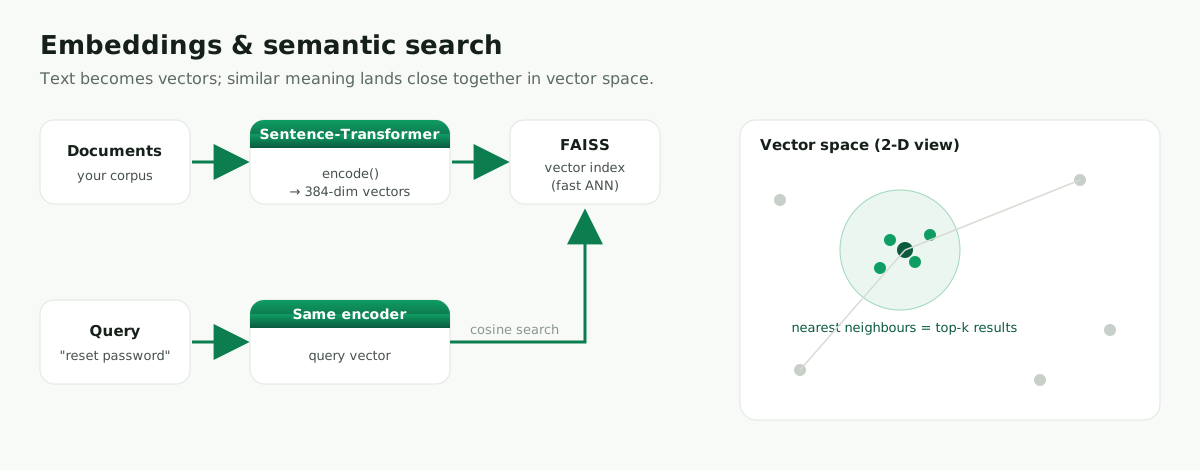
Each document becomes a vector. Each query becomes a vector. Search becomes a nearest-neighbour problem: find the document vectors closest to the query vector.
What you’ll build
A support-FAQ search engine that returns the most relevant articles by meaning — with scores, titles, and categories — that you can save, reload, and later plug into a RAG pipeline.
Prerequisites
Python 3.10+. No GPU needed for a small corpus.
mkdir semantic-search-faiss
cd semantic-search-faiss
Set up an isolated environment. With uv (fast, recommended):
curl -LsSf https://astral.sh/uv/install.sh | sh        # macOS / Linux
# Windows (PowerShell):  powershell -c "irm https://astral.sh/uv/install.ps1 | iex"
uv venv --python 3.12
source .venv/bin/activate                              # Windows: .venv\Scripts\activate
uv pip install -U sentence-transformers faiss-cpu numpy pandas
Or with venv + pip:
python -m venv .venv
source .venv/bin/activate                              # Windows: .venv\Scripts\activate
python -m pip install --upgrade pip
python -m pip install -U sentence-transformers faiss-cpu numpy pandas
Quick environment test:
import faiss, numpy as np
from sentence_transformers import SentenceTransformer

print("FAISS:", faiss.__version__)
print("NumPy:", np.__version__)
model = SentenceTransformer("sentence-transformers/all-MiniLM-L6-v2")
print("Model loaded")
1. Create a small support-document corpus
Real search needs more than raw text — it needs an ID, title, category, URL, or source. FAISS stores vectors; your application keeps the metadata next to the index.
docs = [
    {"id": "password-reset", "title": "Reset your password", "category": "account",
     "text": "If you forgot your password, you can reset it from the login page by clicking Forgot password."},
    {"id": "account-locked", "title": "Unlock your account", "category": "account",
     "text": "Your account may be locked after too many failed login attempts. Wait 15 minutes or contact support."},
    {"id": "billing-address", "title": "Change billing address", "category": "billing",
     "text": "You can update your billing address from the billing settings page in your account."},
    {"id": "invoice-error", "title": "Invoice total is incorrect", "category": "billing",
     "text": "If your invoice total looks wrong, check your plan, tax settings, and recent upgrades."},
    {"id": "download-receipt", "title": "Download a receipt", "category": "billing",
     "text": "Receipts are available in the billing history section. You can download them as PDF files."},
]
2. Generate document embeddings
all-MiniLM-L6-v2 is small, fast, and maps each text to a 384-dimensional vector — a great starting model.
from sentence_transformers import SentenceTransformer
import numpy as np

model = SentenceTransformer("sentence-transformers/all-MiniLM-L6-v2")
texts = [doc["text"] for doc in docs]

embeddings = model.encode(texts, normalize_embeddings=True, show_progress_bar=True)
embeddings = np.asarray(embeddings, dtype="float32")
print("Embedding shape:", embeddings.shape)   # (5, 384)
The first number is the document count; the second is the embedding size.
Why normalize? Cosine similarity compares the direction of two vectors. When embeddings are normalized, a dot product gives the same ranking as cosine similarity — which is exactly why we use FAISS IndexFlatIP (inner product) next.
3. Build a FAISS index
import faiss

dimension = embeddings.shape[1]
index = faiss.IndexFlatIP(dimension)   # exact inner-product = cosine on normalized vectors
index.add(embeddings)
print("Vectors in index:", index.ntotal)   # 5
4. Search by meaning (with metadata)
A good search returns the metadata your app needs, not just raw text:
def search(query: str, k: int = 3):
    q = model.encode([query], normalize_embeddings=True)
    q = np.asarray(q, dtype="float32")
    scores, indices = index.search(q, k)
    results = []
    for score, idx in zip(scores[0], indices[0]):
        doc = docs[idx]
        results.append({"score": round(float(score), 3), "id": doc["id"],
                        "title": doc["title"], "category": doc["category"], "text": doc["text"]})
    return results

for r in search("I forgot my login credentials", k=3):
    print(r["score"], r["title"])
    print(r["text"]); print()
Expected output (numbers vary):
0.62 Unlock your account
Your account may be locked after too many failed login attempts. Wait 15 minutes or contact support.

0.61 Reset your password
If you forgot your password, you can reset it from the login page by clicking Forgot password.

0.27 Download a receipt
Receipts are available in the billing history section. You can download them as PDF files.
The key teaching moment: the query never says “password reset,” yet the system finds the account/password documents. That is the difference between keyword and semantic search.
5. Save and reload the index
FAISS saves the vectors; you save the metadata as JSON. The order matters — vector 0 must still correspond to document 0.
import json
from pathlib import Path

out = Path("search_index"); out.mkdir(exist_ok=True)
faiss.write_index(index, str(out / "docs.faiss"))
with open(out / "docs.json", "w", encoding="utf-8") as f:
    json.dump(docs, f, indent=2, ensure_ascii=False)
Reload:
import json, faiss
index = faiss.read_index("search_index/docs.faiss")
with open("search_index/docs.json", encoding="utf-8") as f:
    docs = json.load(f)
print("Reloaded vectors:", index.ntotal, "| docs:", len(docs))
6. A reusable SemanticSearchEngine class
This is what makes the project feel professional — build, search, save, and load behind one clean object.
import json
from pathlib import Path

import faiss
import numpy as np
from sentence_transformers import SentenceTransformer


class SemanticSearchEngine:
    def __init__(self, model_name: str = "sentence-transformers/all-MiniLM-L6-v2"):
        self.model = SentenceTransformer(model_name)
        self.index = None
        self.docs = []

    def build(self, docs):
        self.docs = docs
        texts = [doc["text"] for doc in docs]
        embeddings = self.model.encode(texts, normalize_embeddings=True, show_progress_bar=True)
        embeddings = np.asarray(embeddings, dtype="float32")
        self.index = faiss.IndexFlatIP(embeddings.shape[1])
        self.index.add(embeddings)

    def search(self, query: str, k: int = 3):
        if self.index is None:
            raise RuntimeError("The index has not been built or loaded.")
        q = np.asarray(self.model.encode([query], normalize_embeddings=True), dtype="float32")
        scores, indices = self.index.search(q, k)
        results = []
        for score, idx in zip(scores[0], indices[0]):
            doc = self.docs[idx].copy()
            doc["score"] = round(float(score), 3)
            results.append(doc)
        return results

    def save(self, path: str):
        if self.index is None:
            raise RuntimeError("There is no index to save.")
        out = Path(path); out.mkdir(parents=True, exist_ok=True)
        faiss.write_index(self.index, str(out / "index.faiss"))
        with open(out / "docs.json", "w", encoding="utf-8") as f:
            json.dump(self.docs, f, indent=2, ensure_ascii=False)

    def load(self, path: str):
        inp = Path(path)
        self.index = faiss.read_index(str(inp / "index.faiss"))
        with open(inp / "docs.json", encoding="utf-8") as f:
            self.docs = json.load(f)
Use it, then save and reload:
engine = SemanticSearchEngine()
engine.build(docs)
for r in engine.search("How can I get a copy of my payment receipt?"):
    print(r["score"], r["title"])

engine.save("search_index")

new_engine = SemanticSearchEngine()
new_engine.load("search_index")
for r in new_engine.search("My bill looks wrong"):
    print(r["score"], r["title"])
7. Mini-project: a support FAQ search engine
Run several realistic queries to feel the search quality:
test_queries = [
    "I forgot my login details",
    "My payment amount is wrong",
    "I need a PDF of my receipt",
    "How do I update my address for invoices?",
]

for query in test_queries:
    print("Query:", query)
    for r in engine.search(query, k=2):
        print("  ", r["score"], r["title"])
    print()
This teaches search quality, not just code — you can see which queries match which articles and tune from there.
8. Chunking long documents
The examples use short FAQ answers, where one row = one document. Real content (PDFs, manuals, blog posts) is long and must be chunked before embedding.
def chunk_text(text: str, chunk_size: int = 120, overlap: int = 30):
    words = text.split()
    step = chunk_size - overlap
    chunks = []
    for start in range(0, len(words), step):
        chunk = words[start:start + chunk_size]
        if chunk:
            chunks.append(" ".join(chunk))
    return chunks

long_doc = ("Semantic search is useful when users describe the same idea using different words. "
            "Instead of matching exact keywords, we compare embeddings. This makes search more "
            "flexible for support articles, documentation, product catalogs, and RAG systems. ") * 10

chunked_docs = [
    {"id": f"semantic-search-{i}", "title": "Semantic Search Guide",
     "category": "documentation", "text": chunk}
    for i, chunk in enumerate(chunk_text(long_doc))
]
print("Chunks:", len(chunked_docs))
Chunking is one of the most important design decisions: too large and results become vague; too small and they lose context. A common starting point is 200–500 words per chunk with some overlap.
9. Scale up to larger corpora
IndexFlatIP is exact search — it compares the query with every vector. That’s perfect for learning and small datasets.
For large collections, approximate indexes are much faster: FAISS offers IndexIVFFlat and IndexHNSWFlat, which trade a little recall for a lot of speed.
In short: use FAISS when you want a local, fast, Python-native vector search engine. Use a vector database (Milvus, Pinecone, Weaviate, Qdrant, pgvector) when you need persistence, metadata filtering, access control, distributed storage, or managed operations.
10. How this becomes RAG
Semantic search is the retrieval step in RAG (retrieval-augmented generation). First you search for relevant chunks; then you pass those chunks to an LLM as context, so it answers from the retrieved text instead of only its internal knowledge.
def build_context(query: str, k: int = 3):
    results = engine.search(query, k=k)
    return "\n\n".join(f"Title: {r['title']}\nText: {r['text']}" for r in results)

print(build_context("How do I get my receipt?"))
This doesn’t call an LLM yet — it prepares the context you’d send to one, which keeps the tutorial focused on retrieval while showing how it connects to RAG.
Common errors
If FAISS fails to import, install faiss-cpu (the easiest option on most machines).
If results are poor, make sure documents and queries use the same embedding model — never index with one and query with another.
If scores look strange, normalize both documents and queries when using IndexFlatIP as cosine similarity.
If search is slow, check the corpus size and index type — IndexFlatIP is exact; approximate indexes are better for very large collections.
If long documents don’t retrieve well, split them into chunks before embedding.
FAQ
Which embedding model should I use?
all-MiniLM-L6-v2 for speed and small vectors; all-mpnet-base-v2 for stronger English quality; multilingual-e5-base for multiple languages.
Is FAISS a vector database? No — FAISS is a vector similarity search library. It’s excellent for local indexing, but it isn’t a managed database with users, permissions, backups, filtering APIs, and distributed storage.
Is semantic search the same as RAG? No. Semantic search retrieves relevant text; RAG uses that text as context for a language model. Retrieval is the first half of RAG.
Do I need a GPU? Not for this tutorial — CPU is fine for small corpora. A GPU helps when embedding many documents or using larger models.
Should I normalize embeddings? Yes, if you want inner product to behave as cosine similarity — normalize both documents and queries.
Conclusion
You’ve built a complete semantic search engine in Python: you embedded documents with Sentence Transformers, indexed them with FAISS, searched by meaning, returned metadata, saved and reloaded the index, wrapped it in a reusable class, and prepared retrieved context for a future RAG system.
The important idea is simple: once text becomes vectors, search becomes similarity. That one idea powers FAQ search, document retrieval, recommendations, clustering, and the retrieval layer of RAG applications.
Leave a comment