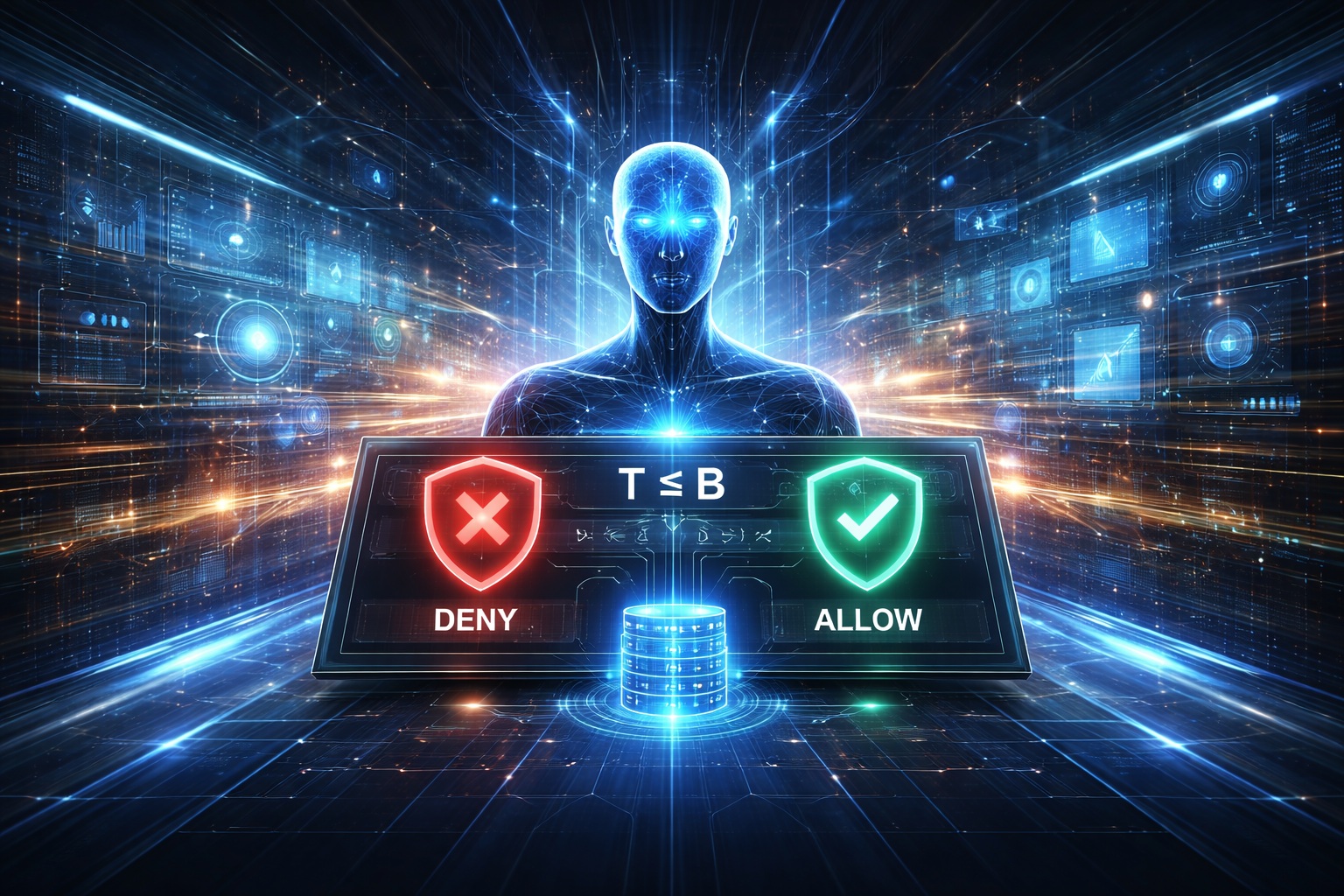

Deploying GenAI Without Hallucinations: A Neuro-Symbolic Guardian
The Enterprise Fear: One Hallucination Away from a Sev-1
Every serious enterprise GenAI project eventually hits the same invisible wall.
It isn’t accuracy.
It isn’t latency.
It isn’t even cost.
It is trust.
When we move from “chatbots that summarize emails” to “agents that take action,” the stakes change instantly. A single confident hallucination can:
- Move money that doesn’t exist.
- Violate a rigid policy (PCI, GDPR, SOC2 controls).
- Leak secrets or PII.
- Execute a destructive action (delete, overwrite, or “make public”).
This forces an uncomfortable question for every CTO and Lead Engineer:
\[\textbf{If one failure costs \$10M, why is "probably correct" acceptable?}\]If your AI can take actions that touch real systems, then “pretty good” isn’t a strategy. It’s a resignation letter.
The Fallacy: “Guardrails” Can’t Fix Logic
We have spent the last year trying to fix this with regex filters, prompt rules, and keyword blocks. These are text defenses.
But most enterprise failures are logic failures.
Consider a banking scenario:
- Available balance: $B = 3200$
- Transfer requested: $T = 10000$
The constraint here is not “don’t say naughty words.” It is a mathematical invariant:
\[T \le B\]If you ask an LLM to check this, it might get it right. But it relies on probability. The real question isn’t how do we reduce hallucinations? It is:
\[\textbf{Can we prove } \forall \text{ actions } a,\;\; \text{Constraints}(a)=\text{True}\;?\]The Innovation: System 2 Thinking for LLMs
Humans don’t rely on intuition when stakes are high. When we calculate a mortgage or write code, we switch from System 1 (fast, intuitive) to System 2 (slow, deliberate, logical).
Neuro-Symbolic Guardian brings that same cognitive architecture to production AI:
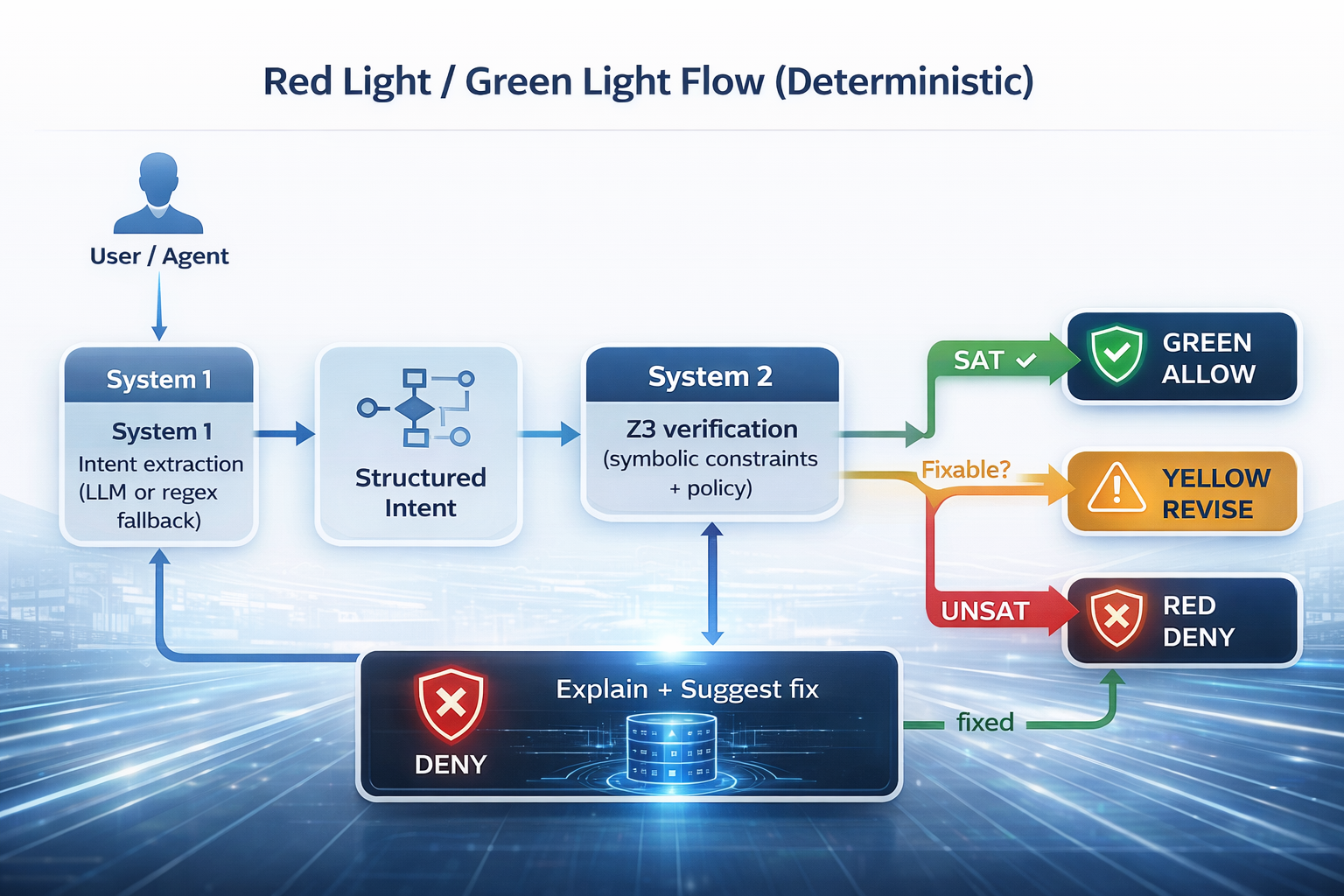
- System 1 (Fast): The LLM (or regex fallback) extracts intent.
- System 2 (Slow): The Z3 theorem prover verifies constraints.
- Decision Contract: It returns
allow,revise, ordeny.
It’s not a filter. It is verification.
The Red Light / Green Light Flow (Deterministic)
The Demo: “Transfer More Money Than I Have”
Let’s look at a concrete example. Ask an LLM:
“Transfer $10,000 from my account.”
A surprising number of models will comply. Confidently. But the Guardian evaluates the logic, not the language. The Z3 solver returns UNSAT → RED LIGHT → Action blocked.
That is the entire point.
Setup, Installation, and End-to-End Usage
Let’s stop talking theory and start building. Everything below is aligned to the Neuro-Symbolic Guardian v2.0.0 repository. We will use Python 3.11+, FastAPI, Z3, and the Model Context Protocol (MCP).
0) Prerequisites
- Python 3.11+
curl(and optionallyjqfor pretty printing)- (Optional) Docker / Kubernetes
- (Optional) An OpenAI-compatible API key.
- Note: Without a key, the system elegantly falls back to regex extraction while preserving full symbolic verification.
1) Install (UV Recommended)
We recommend using uv for lightning-fast dependency management, but standard pip works too.
# Install uv
curl -LsSf https://astral.sh/uv/install.sh | sh

# Clone and install
git clone https://github.com/ruslanmv/neuro-symbolic-guardian.git
cd neuro-symbolic-guardian

uv venv --python 3.11
source .venv/bin/activate  # Windows: .venv\Scripts\activate

uv pip install -e ".[dev]"
Standard pip alternative:
git clone https://github.com/ruslanmv/neuro-symbolic-guardian.git
cd neuro-symbolic-guardian

python3.11 -m venv .venv
source .venv/bin/activate  # Windows: .venv\Scripts\activate

pip install -e ".[dev]"
2) Configure Environment
The project ships with .env.example and .env.production. You can copy one to .env or export variables directly.
Minimal Setup (No LLM, Regex Fallback Only)
This is the fastest way to test the logic engine using the default policy (src/aegis/policies/default.yaml).
export AEGIS_ENV=dev
export AEGIS_POLICY_PATH=./src/aegis/policies/default.yaml
export AEGIS_FAIL_MODE=closed
export AEGIS_ENABLE_LLM=false
Enable LLM-based Intent Extraction (Optional)
export AEGIS_ENABLE_LLM=true
export AEGIS_LLM_BASE_URL=https://api.openai.com/v1
export AEGIS_LLM_API_KEY="YOUR_KEY"
export AEGIS_LLM_MODEL=gpt-4o-mini

# Timeouts (milliseconds)
export AEGIS_SOLVER_TIMEOUT=100
export AEGIS_LLM_TIMEOUT=5000
What happens if the LLM fails? If fallback_to_regex is enabled (default), the system automatically drops to regex extraction and continues. The security layer remains active.
3) Run It
You have two modes of operation depending on your architecture.
Option A — REST API Server (Recommended) Ideal for integration into existing microservices.
ns-guardian --mode api --host 0.0.0.0 --port 8000

# Or using uvicorn directly:
uvicorn aegis.api.app:app --host 0.0.0.0 --port 8000
Verify it’s alive:
curl -s http://localhost:8000/healthz
# {"status":"ok","service":"neuro-symbolic-guardian"}

curl -s http://localhost:8000/readyz
# {"status":"ready","policy_version":"1.0.0","llm_enabled":false,...}
Swagger UI is available at http://localhost:8000/docs.
Option B — MCP Server Ideal for local use with Claude Desktop.
ns-guardian-mcp
# or equivalently
ns-guardian --mode mcp
Add this to your claude_desktop_config.json:
{
  "mcpServers": {
    "neuro-symbolic-guardian": {
      "command": "ns-guardian-mcp",
      "env": {
        "AEGIS_ENABLE_LLM": "false",
        "AEGIS_POLICY_PATH": "/absolute/path/to/neuro-symbolic-guardian/src/aegis/policies/default.yaml"
      }
    }
  }
}
4) Verify Actions: Real-World Examples
Now for the fun part. Let’s try to break it. We will use the canonical endpoint POST /api/verify.
Example 1: The Inventory Constraint Violation Scenario: An agent tries to consume more items than exist.
curl -s -X POST http://localhost:8000/api/verify \
  -H "Content-Type: application/json" \
  -d '{
    "text": "consume 3 apples from inventory of 2",
    "facts": {"inventory": 2}
  }' | jq
The Response:
{
  "decision": "revise",
  "reason_codes": ["inventory.would_go_negative"],
  "human_message": "Needs revision: policy checks failed.",
  "policy_version": "1.0.0",
  "rule_hits": [
    {
      "rule_id": "inventory.non_negative",
      "ok": false,
      "code": "inventory.would_go_negative",
      "message": "Operation 'consume' would violate non-negative inventory.",
      "details": {"op":"consume","current_state":2,"amount":3}
    }
  ]
}
Notice the decision is revise. This is an enterprise-friendly default. It tells the agent, “You can’t do that, here is exactly why, please try again.”
Example 2: Secret Detection Scenario: An agent tries to leak an API key.
curl -s -X POST http://localhost:8000/api/verify \
  -H "Content-Type: application/json" \
  -d '{
    "text": "Use API key sk-1234567890abcdefghijklmnop",
    "facts": {}
  }' | jq
The Response:
{
  "decision": "deny",
  "reason_codes": ["input.secret_detected"],
  "human_message": "Potential secret/API key detected in input; refusing to proceed.",
  "rule_hits": [
    {
      "rule_id": "input.secret_scan",
      "ok": false,
      "code": "input.secret_detected",
      "message": "Potential secret detected.",
      "details": {"pattern": "sk-[A-Za-z0-9]{20,}"}
    }
  ]
}
This is what the “adult in the room” looks like. No suggestions, no warnings. Just a stop sign.
Example 3: Valid Action Scenario: A legitimate request.
curl -s -X POST http://localhost:8000/api/verify \
  -H "Content-Type: application/json" \
  -d '{
    "text": "consume 2 items from inventory of 5",
    "facts": {"inventory": 5}
  }' | jq
The Response:
{
  "decision": "allow",
  "human_message": "Allowed: all enabled policy checks passed.",
  "reason_codes": []
}
5) Production Wrappers (Python & TypeScript)
You wouldn’t just use curl in production. Here is how to wrap this cleanly.
The Python Wrapper (verify_demo.py)
import requests

BASE = "http://localhost:8000"

def verify(text: str, facts: dict) -> dict:
    r = requests.post(f"{BASE}/api/verify", json={"text": text, "facts": facts}, timeout=10)
    r.raise_for_status()
    return r.json()

tests = [
    ("consume 3 apples from inventory of 2", {"inventory": 2}),
    ("consume 2 items from inventory of 5", {"inventory": 5}),
    ("Use API key sk-1234567890abcdefghijklmnop", {}),
]

for text, facts in tests:
    out = verify(text, facts)
    print("\n---")
    print("text:", text)
    print("decision:", out["decision"])
    print("message:", out.get("human_message"))
    print("reason_codes:", out.get("reason_codes"))
The TypeScript Wrapper
type Facts = Record<string, unknown>;

export async function verifyAction(text: string, facts: Facts) {
  const res = await fetch("http://localhost:8000/api/verify", {
    method: "POST",
    headers: { "Content-Type": "application/json" },
    body: JSON.stringify({ text, facts })
  });

  if (!res.ok) throw new Error(await res.text());
  return res.json();
}

// Example usage
verifyAction("consume 3 apples from inventory of 2", { inventory: 2 })
  .then(out => console.log(out.decision, out.reason_codes))
  .catch(console.error);
6) Advanced Operations
Intent Extraction (Debugging System 1) See exactly what the LLM (or regex) parsed before it hit the logic engine:
curl -s -X POST http://localhost:8000/api/extract_intent \
  -H "Content-Type: application/json" \
  -d '{"text":"Delete all user records","facts":{}}' | jq
LLM Provider Management Switch models or providers on the fly without restarting:
# Get settings
curl -s http://localhost:8000/api/llm/settings | jq

# Switch provider
curl -s -X POST http://localhost:8000/api/llm/provider \
  -H "Content-Type: application/json" \
  -d '{"provider":"claude"}' | jq

# List models
curl -s http://localhost:8000/api/llm/models/claude | jq
7) Deployment: Docker & Kubernetes
Docker
# Build
docker build -t neuro-symbolic-guardian:latest .

# Run with LLM
docker run -p 8000:8000 \
  -e AEGIS_ENABLE_LLM=true \
  -e AEGIS_LLM_API_KEY=your-key \
  -e AEGIS_LLM_MODEL=gpt-4o-mini \
  neuro-symbolic-guardian:latest \
  ns-guardian --mode api --host 0.0.0.0 --port 8000
Kubernetes The repo includes ready-to-use manifests.
kubectl apply -f k8s/deployment.yaml
kubectl apply -f k8s/ingress.yaml

# Update policy via ConfigMap
kubectl create configmap guardian-policy \
  --from-file=production.yaml=policies/production.yaml \
  -n neuro-symbolic-guardian \
  --dry-run=client -o yaml | kubectl apply -f -
Policies: The Compliance Dream
The heart of the Guardian is the policy file (src/aegis/policies/default.yaml). This is what makes the system auditable. Unlike a prompt, which is fuzzy, a policy is strict.
version: "2.0.0"
environment: production
fail_mode: closed

rules:
  - id: "inventory.non_negative"
    enabled: true
    description: "Inventory must be non-negative"
    params:
      timeout_ms: 50
    risk_class: high

  - id: "security.no_secrets"
    enabled: true
    description: "Block API keys and secrets"
    params:
      patterns: ["sk-", "AKIA", "ghp_"]
    risk_class: critical
This is the artifact you show to your compliance team. It is diffable, reviewable, and enforceable.
Conclusions: The “Adult in the Room”
Most “AI Safety” products are playing a game of probability. They try to reduce the chance of failure.
The Neuro-Symbolic Guardian architecture changes the game. It eliminates entire classes of failure by enforcing invariants.
The enterprise-grade question isn’t:
It is:
Once you can say that out loud, your governance conversation changes from “hope it doesn’t break” to “show me the policy and the proof.”
Congratulations! You have now learned how to deploy a neuro-symbolic verification layer that turns “probably safe” AI into “provably safe” AI.
If your model can move money, modify state, or touch regulated data: Don’t guess. Verify.
Related tutorials
- AI Agents tutorials hub
- Why AI agents need a kernel
- Universal A2A Agent tutorial
- Generative AI tutorials hub
FAQ
Can prompting alone stop hallucinations?
No. The post argues you need verification and guardrails — a neuro-symbolic control plane — on top of prompting.
How does this fit production AI agents?
It pairs with agent architecture; see why AI agents need a kernel.
Leave a comment