
One Sentence to a Running Agentic Workflow — Matrix Designer, Matrix Builder, LangFlow & OllaBridge Cloud
Who this is for: curious beginners who want to build something agentic (an app where an AI does multi-step work) but have been scared off by the jargon. We’ll go from a single sentence to a running workflow — in Python, in LangFlow, and behind a web page — and explain every piece in plain language.
The big idea, in one picture
Building with AI usually fails for a boring reason: nobody decides what the whole thing should be before splitting it into tasks. So every step improvises, and you get a messy prototype.
The Matrix ecosystem — by Ruslan Magana Vsevolodovna — fixes that by giving each job to a specialist:
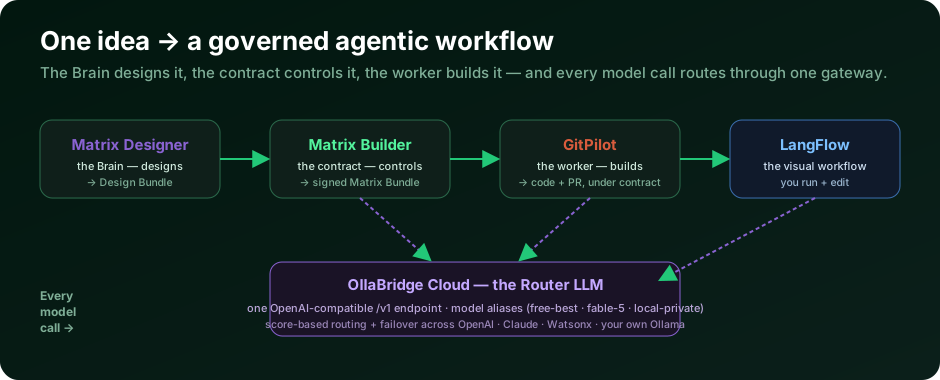
| Component | What it does |
|---|---|
| Matrix Designer | The architect. Designs the whole solution as a Design Bundle. |
| Matrix Builder | The inspector. Turns that plan into a signed contract. |
| GitPilot | The builder. Writes the code and opens a pull request, inside the contract. |
| OllaBridge Cloud | The gateway. One URL that routes every model call to the best model. |
We’ll build a small but real example: a “Research Assistant” agentic workflow that takes a question, thinks in steps, and returns a clean answer — first as a runnable Python program, then wired visually in LangFlow, then behind a TypeScript page.
Meet the “router LLM”: OllaBridge Cloud
Before we build, let’s demystify the most useful piece for beginners. Normally every app needs a different endpoint and key for every model — OpenAI here, Claude there, a local model somewhere else. It’s a mess.
OllaBridge Cloud is one OpenAI-compatible endpoint that routes for you. You call a single URL, and it picks the best available model behind the scenes, with automatic failover. You use logical aliases instead of vendor names:
| Alias | Resolves to… |
|---|---|
free-best |
the best free provider available right now |
local-private |
your own private Ollama nodes (nothing leaves your control) |
fable-5 / claude-best |
premium Anthropic Claude (incl. claude-fable-5) |
Here’s the live model list this very tutorial saw from the router (GET /v1/models):
free-best · free-fast · qwen2.5:1.5b · free-flex · cheap-reasoning ·
local-private · fable-5 · claude-best · claude-fast · gpt-best · grok-best · qwen2.5:0.5b
Why this matters: write your app once against
free-best. Tomorrow you can switch tofable-5by changing one word — no new keys, no rewrite. That is what makes it a router.
Step 1 — Let the Brain design the workflow (Matrix Designer)
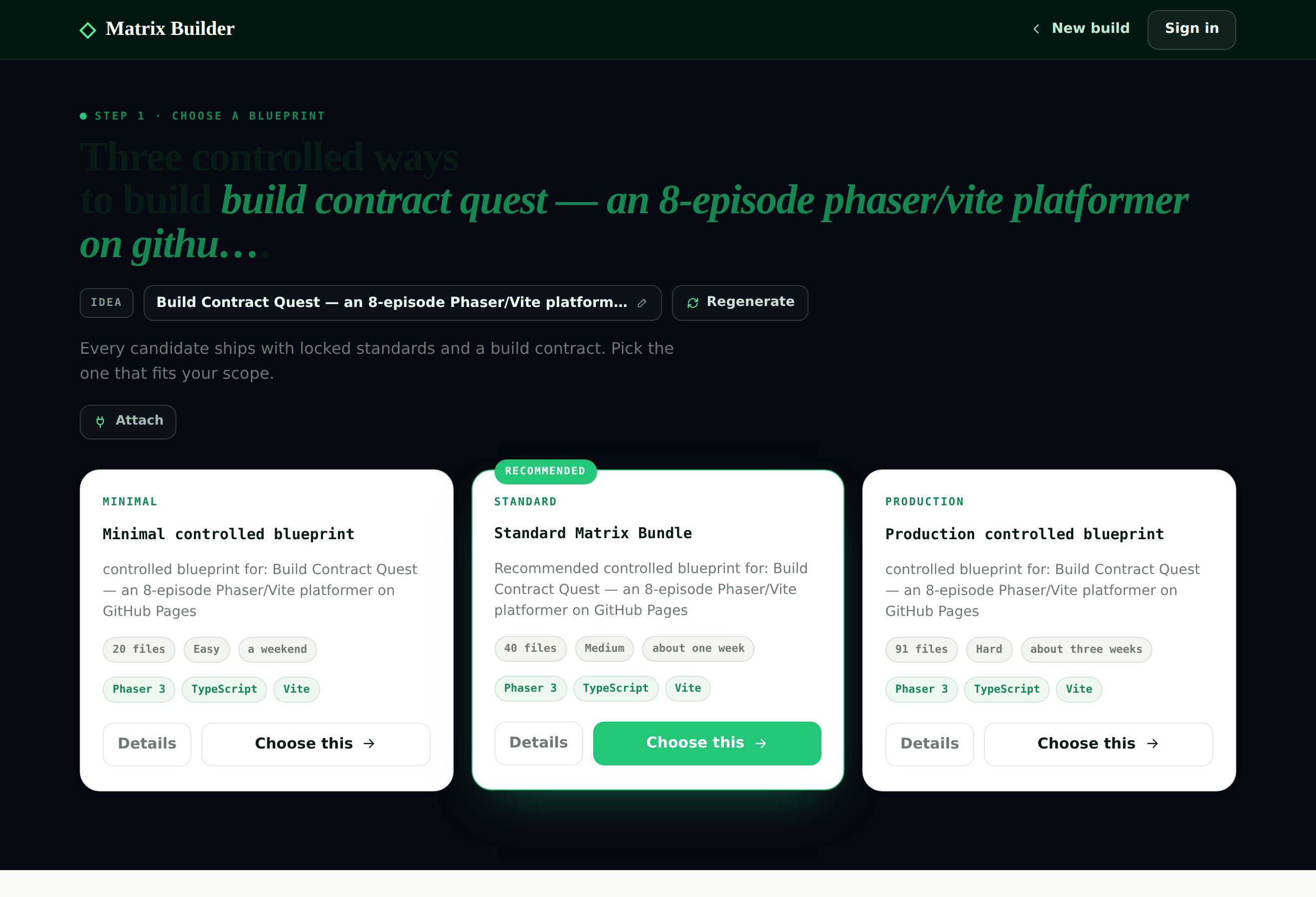
You start with a sentence and a blueprint (a starting shape — e.g. “agentic workflow”). Matrix Designer’s AI crew then designs the whole solution: framework choice, architecture, data contracts, acceptance criteria, and an ordered batch roadmap.
Run it locally — and tell it to design for LangFlow:
git clone https://github.com/agent-matrix/matrix-designer.git
cd matrix-designer
make install
export MATRIX_DESIGNER_BACKEND=langflow     # crewai | langgraph | langflow
python -m matrix_designer.service            # FastAPI on :8077
Give it the idea — “A research assistant agentic workflow: take a question, think, answer.” — and it returns a Design Bundle: a complete, reviewable plan, broken into batches that fit together.
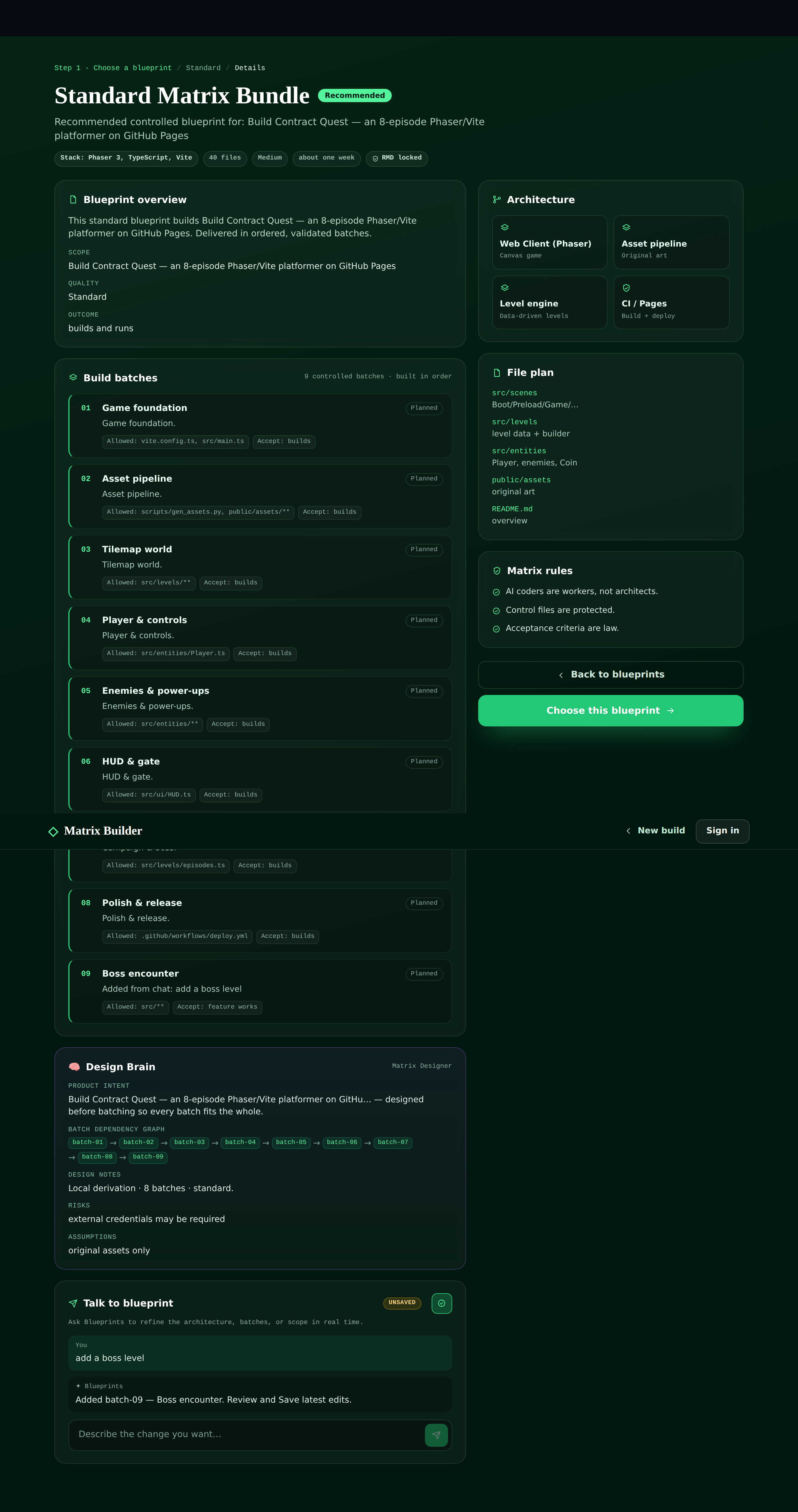
Step 2 — Turn the design into a contract (Matrix Builder)
A plan is still just words. Matrix Builder turns it into a Matrix Bundle — a signed contract an AI coder must obey: a blueprint (what to build), locked standards (the signed rules), tasks (ordered steps), and forbidden paths (files the coder may never touch).
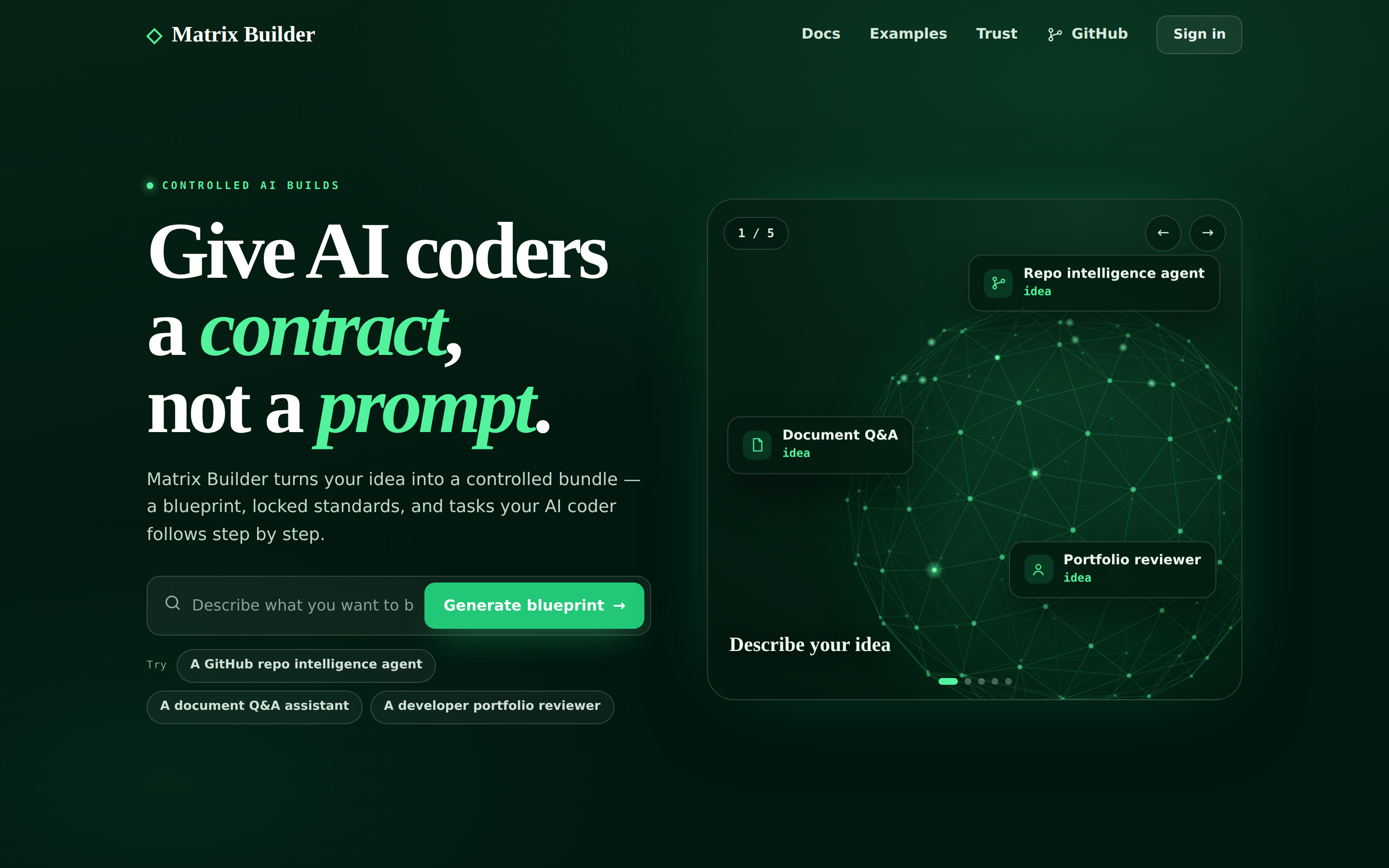
It even proposes candidate shapes so you pick the one you mean:
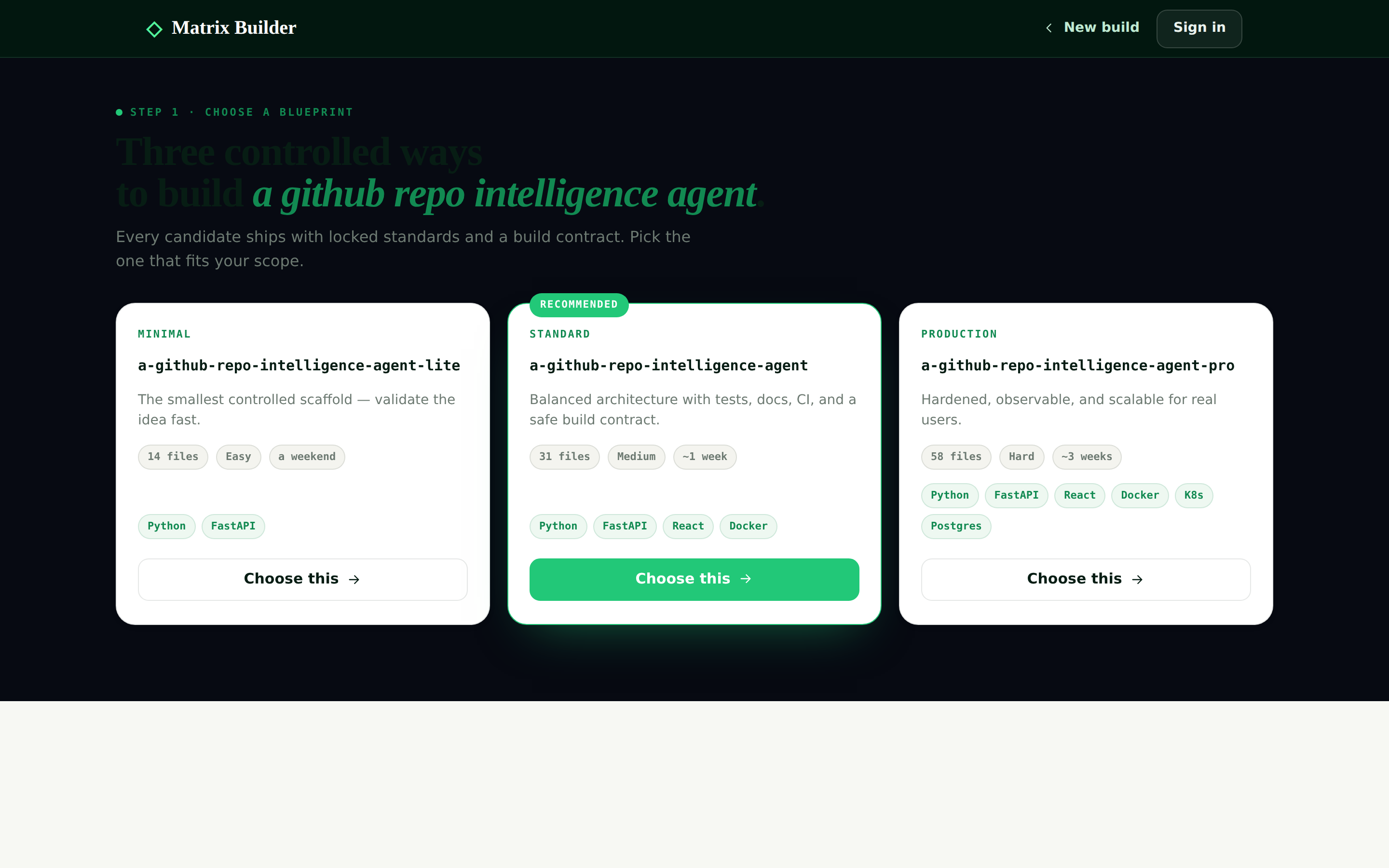
The result is auditable — anyone can verify what the AI was allowed to change. That’s the heart of trustworthy AI coding.
Step 3 — Build it under contract (GitPilot)
The worker steps in. Matrix Builder hands the signed bundle to GitPilot over a secure agent-to-agent channel:
POST /api/v1/gitpilot/runs
Matrix Builder is the architect and the judge. GitPilot is the worker. GitPilot may read the bundle and implement inside the contract, but it can never edit the control files, approve its own work, or sign the commit.
New to GitPilot? Start with the first post.
Step 4 — Run the agentic workflow in Python (hands-on)
Let’s actually run the workflow. It’s the same three-node shape you’ll wire in LangFlow next — written in Python so you can read every step:
Plan → Research (per sub-question) → Synthesize — each step is one call to the router.
Get the complete, tested code: all the files in this post are on GitHub Gist — gist.github.com/ruslanmv/d311931298110f5290c61f16ac97cf5b. Drop them in one folder and run.
Step 4.0 · Pair with OllaBridge Cloud
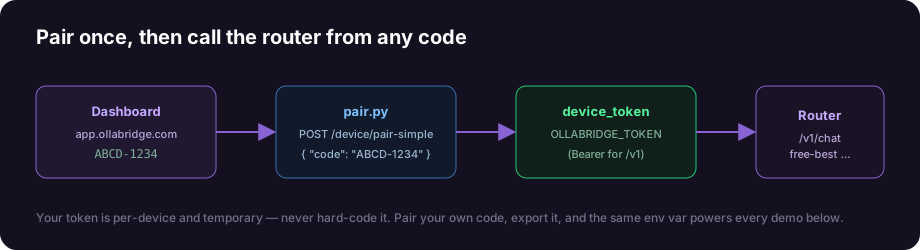
Go to app.ollabridge.com → Dashboard → Pair a device, copy the code (e.g. ABCD-1234), and exchange it for a token with this helper (pair.py):
# pair.py — turn a pairing code into a device token (standard library only)
import argparse, json, sys, urllib.request

def pair(code, base_url):
    body = json.dumps({"code": code}).encode("utf-8")
    req = urllib.request.Request(f"{base_url.rstrip('/')}/device/pair-simple",
        data=body, headers={"Content-Type": "application/json"}, method="POST")
    with urllib.request.urlopen(req, timeout=30) as r:
        return json.loads(r.read().decode("utf-8"))

if __name__ == "__main__":
    ap = argparse.ArgumentParser(); ap.add_argument("code")
    ap.add_argument("--url", default="https://app.ollabridge.com"); a = ap.parse_args()
    res = pair(a.code, a.url)
    if res.get("status") != "ok":
        print("Pairing failed:", res.get("error")); sys.exit(1)
    print("Paired! Device:", res.get("device_id"))
    print(f"\n  export OLLABRIDGE_URL={a.url}\n  export OLLABRIDGE_TOKEN={res['device_token']}")
Reproducible and safe: the token is per-device and temporary — never hard-code it. Everyone pairs their own code, which is why this tutorial always reproduces.
Step 4.1 · Virtual environment & install
mkdir research-agent && cd research-agent
python3 -m venv .venv
source .venv/bin/activate           # Windows: .venv\Scripts\activate

echo "requests>=2.31" > requirements.txt
pip install -r requirements.txt

python pair.py ABCD-1234            # use your dashboard code
export OLLABRIDGE_URL=https://app.ollabridge.com
export OLLABRIDGE_TOKEN=...         # the token pair.py printed
Step 4.2 · The router client (ollabridge_client.py)
# ollabridge_client.py
import os, requests
BASE = os.environ.get("OLLABRIDGE_URL", "https://app.ollabridge.com").rstrip("/")
TOKEN = os.environ.get("OLLABRIDGE_TOKEN", "not-needed")

def _h(): return {"Authorization": f"Bearer {TOKEN}", "Content-Type": "application/json"}

def chat(prompt, *, model="free-best", system=None, temperature=0.3):
    messages = ([{"role": "system", "content": system}] if system else [])
    messages.append({"role": "user", "content": prompt})
    r = requests.post(f"{BASE}/v1/chat/completions", headers=_h(),
        json={"model": model, "messages": messages, "temperature": temperature,
              "stream": False}, timeout=120)
    r.raise_for_status()
    return (r.json()["choices"][0]["message"]["content"] or "").strip()
Step 4.3 · The agentic workflow (app2_agent.py)
# app2_agent.py — Plan -> Research -> Synthesize, all on one router
import json, re, sys
from ollabridge_client import chat

def plan(question, model):
    raw = chat(f'Break this into at most 3 focused research sub-questions. '
               f'Return ONLY a JSON array of strings.\n\nQuestion: {question}',
               model=model, system="You are a meticulous research planner.", temperature=0.2)
    raw = re.sub(r"^```[a-zA-Z]*\n?|\n?```$", "", raw.strip()).strip()
    try:
        subs = json.loads(raw)
        return [str(s) for s in subs][:3] if isinstance(subs, list) else [question]
    except json.JSONDecodeError:
        return [question]

def research(subq, model):
    return chat(f"Answer in 2-3 sentences, concrete and practical:\n{subq}",
                model=model, system="You are a concise domain expert.", temperature=0.3)

def synthesize(question, notes, model):
    bundle = "\n\n".join(f"Q: {q}\nA: {a}" for q, a in notes)
    return chat(f"Using these notes, write a clear, friendly final answer to the user's "
                f"original question.\n\nORIGINAL: {question}\n\nNOTES:\n{bundle}",
                model=model, system="You are a helpful writer. Be encouraging and concrete.",
                temperature=0.4)

def main():
    question = sys.argv[1] if len(sys.argv) > 1 else "How do I start learning to build AI agents?"
    model = sys.argv[2] if len(sys.argv) > 2 else "free-best"
    print(f"Question: {question}\nModel:    {model}  (routed by OllaBridge Cloud)\n")

    print("[Planner] decomposing the question…")
    subs = plan(question, model)
    for i, s in enumerate(subs, 1): print(f"   {i}. {s}")

    print("\n[Researcher] answering each sub-question…")
    notes = []
    for i, s in enumerate(subs, 1):
        a = research(s, model); notes.append((s, a))
        print(f"   - sub-question {i} answered ({len(a)} chars)")

    print("\n[Writer] synthesizing the final answer…\n")
    answer = synthesize(question, notes, model)
    print("=" * 60); print(answer); print("=" * 60)
    print(f"\nAgentic workflow complete — 1 plan + {len(subs)} research + 1 synthesis calls.")

if __name__ == "__main__":
    main()
Step 4.4 · Run it
python app2_agent.py "How do I start learning to build AI agents?"
Real output from this exact code (trimmed):
Question: How do I start learning to build AI agents?
Model:    free-best  (routed by OllaBridge Cloud)

[Planner] decomposing the question…
   1. What are the fundamental concepts and prerequisites for building AI agents?
   2. What programming languages and tools are commonly used for AI agent development?
   3. What resources and tutorials are available for beginners to learn AI agent development?

[Researcher] answering each sub-question…
   - sub-question 1 answered (377 chars)
   - sub-question 2 answered (380 chars)
   - sub-question 3 answered (374 chars)

[Writer] synthesizing the final answer…

============================================================
To start learning how to build AI agents, focus on a foundation in Python,
machine-learning basics, and frameworks like TensorFlow or PyTorch. Begin with
beginner courses (Coursera's Machine Learning, Udemy), get hands-on with GitHub
AI repositories, and build small projects first.
============================================================

Agentic workflow complete — 1 plan + 3 research + 1 synthesis calls.
That’s a genuine agentic loop — five model calls coordinated to produce one good answer — and it ran entirely through one router. Want a smarter brain? python app2_agent.py "..." fable-5. Want it fully private? ... local-private. The code never changes.
Step 5 — Wire the same workflow visually in LangFlow
LangFlow lets you build the same agent by dragging nodes — no code. Our workflow is four nodes:
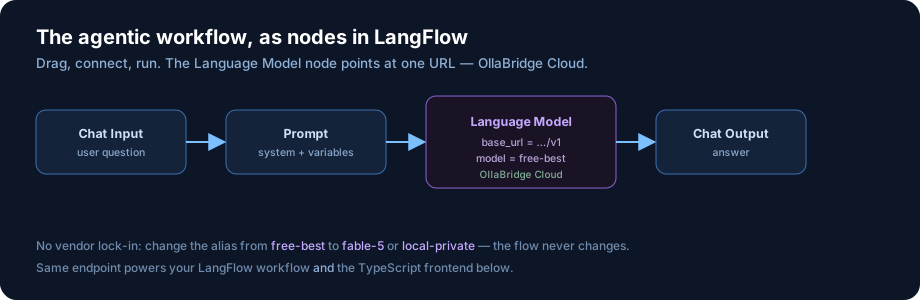
Chat Input → Prompt → Language Model → Chat Output
The only setting that matters is the Language Model node — point it at the same router:
| Field | Value |
|---|---|
| Base URL | https://app.ollabridge.com/v1 |
| API key | your device token from pair.py |
| Model | free-best (or fable-5, local-private …) |
Because LangFlow speaks the OpenAI format and OllaBridge Cloud is OpenAI-compatible, they click together with zero glue code. Press Run, type a question, and your visual workflow answers — using the exact endpoint your Python program just used.
Step 6 — A TypeScript frontend on the router
Finally, a friendly web page. It’s the same chat call, in the browser’s language:
npm create vite@latest research-ui -- --template vanilla-ts
cd research-ui && npm install
src/llm.ts — your router LLM client:
// src/llm.ts — one endpoint, any model, automatic routing + failover.
const ROUTER = "https://app.ollabridge.com/v1";
const TOKEN  = import.meta.env.VITE_OLLABRIDGE_TOKEN as string; // your device token

export async function ask(prompt: string, model = "free-best"): Promise<string> {
  const res = await fetch(`${ROUTER}/chat/completions`, {
    method: "POST",
    headers: { "Content-Type": "application/json", Authorization: `Bearer ${TOKEN}` },
    body: JSON.stringify({
      model,
      messages: [
        { role: "system", content: "You are a concise research assistant." },
        { role: "user", content: prompt },
      ],
      stream: false,
    }),
  });
  if (!res.ok) throw new Error(`Router error ${res.status}`);
  return (await res.json()).choices[0].message.content as string;
}
src/main.ts — a 15-line UI:
import { ask } from "./llm";
const app = document.querySelector<HTMLDivElement>("#app")!;
app.innerHTML = `
  <h1>Research Assistant</h1>
  <input id="q" placeholder="Ask me anything…" style="width:70%" />
  <button id="go">Ask</button>
  <pre id="out" style="white-space:pre-wrap"></pre>`;
const out = document.querySelector<HTMLPreElement>("#out")!;
document.querySelector("#go")!.addEventListener("click", async () => {
  const q = (document.querySelector<HTMLInputElement>("#q")!).value;
  out.textContent = "Thinking…";
  try { out.textContent = await ask(q); }      // ← routed through OllaBridge Cloud
  catch (e) { out.textContent = `Error: ${(e as Error).message}`; }
});
echo "VITE_OLLABRIDGE_TOKEN=your_device_token" > .env
npm run dev
Open the page, type a question — a working AI app on the same router that powers your Python program and your LangFlow workflow.
The lesson: route every model call through OllaBridge Cloud, and your Python agent, your LangFlow workflow, and your TypeScript frontend all share one endpoint — and the freedom to switch providers without touching the code.
What you just built
From one sentence you went to:
- a designed agentic workflow (Matrix Designer),
- a signed contract for it (Matrix Builder),
- code built under that contract (GitPilot),
- a runnable Python agent (Plan → Research → Synthesize),
- the same workflow wired visually (LangFlow), and
- a TypeScript web app — all on one router LLM (OllaBridge Cloud).
Every layer is open source, every model call is swappable, every AI action is governed. That’s not a toy — it’s a blueprint for software you can trust.
Resources
- Code from this post: gist.github.com/ruslanmv/d311931298110f5290c61f16ac97cf5b
- Matrix Designer: github.com/agent-matrix/matrix-designer
- Matrix Builder: github.com/agent-matrix/matrix-builder · live demo
- GitPilot: github.com/ruslanmv/gitpilot · getting-started post
- OllaBridge Cloud: github.com/ruslanmv/ollabridge-cloud
- LangFlow: langflow.org
Built and open-sourced by Ruslan Magana Vsevolodovna as part of an ongoing effort to make governed, multi-agent software more approachable, reproducible, and useful for real builders.
Leave a comment