

Build Your First Chatbot With Memory Using Matrix Context
Hello everyone. Today we are going to give a chatbot something most chatbots do not have: a memory — one that remembers the right facts and uses them later, instead of forgetting you the moment the conversation ends. We will do it in three lines of Python, with no API keys for the first run, using an open-source, local-first engine called Matrix Context.
The twist is that this is not “stuff everything into a vector database and hope.” Matrix Context stores memory as typed context experts — a profile expert for who the user is, a semantic expert for durable facts, a session expert for the conversation, a policy expert for rules — and it routes a question to the few experts that matter before it retrieves anything. Then it shows you exactly why it recalled what it did. By the end of this post you will have a working bot, and you will understand the one pattern that makes it tick.
The idea: two calls per turn
The whole thing comes down to two calls, one before the model answers and one after.
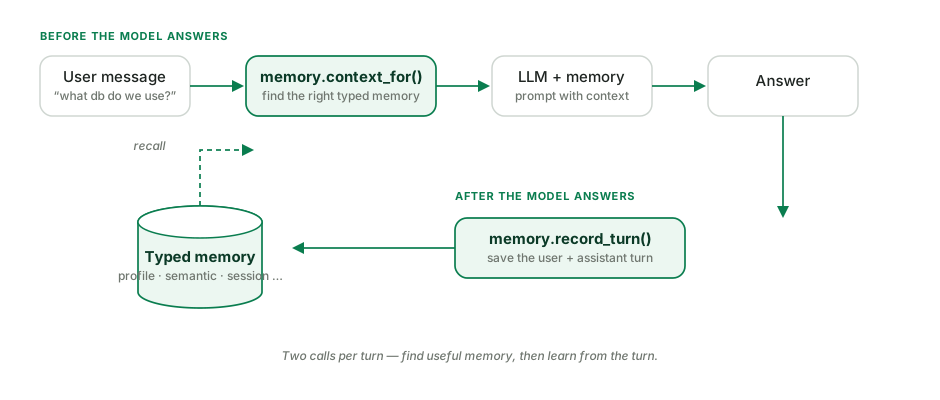
- Before the model answers, you ask memory for the context that is relevant to the user’s message —
memory.context_for(message). - After the model answers, you save the turn so the bot keeps learning —
memory.record_turn(message, answer).
That is it. Everything else is detail.
Install
pip install matrix-context
No other services, no cloud account, no model download to get started. The default embedder runs offline.
A tiny chatbot you can run right now
Save this as bot.py and run python bot.py. It uses a fake model so it runs instantly with no keys — we will swap in a real one in a minute.
import matrix_context as mc

# 1) Open a memory (a small local file under .matrix-context/)
memory = mc.open("my-first-chatbot")

# 2) Teach it one fact
memory.add("The team uses Postgres for production.")

# 3) A fake "model" so we can run with no API keys
def fake_llm(prompt: str) -> str:
    return "The team uses Postgres for production." if "Postgres" in prompt else "I do not know yet."

# 4) One chat turn = find memory -> answer -> remember
def chat(user_message: str) -> str:
    context = memory.context_for(user_message)          # BEFORE: find useful memory
    answer = fake_llm(f"""
You are a helpful assistant.

Useful memory:
{context}

User: {user_message}
Answer:""")
    memory.record_turn(user_message, answer)            # AFTER: learn the turn
    return answer

print(chat("What database do we use?"))
# -> The team uses Postgres for production.
Notice that the question never said the word “Postgres”, yet the bot answered correctly. Matrix Context found the fact for you and put it in front of the model.
Line by line:
mc.open("my-first-chatbot")opens (or creates) a memory store at.matrix-context/my-first-chatbot.db.memory.add("…")saves one fact. You can passexpert=orscope=to type or partition it.memory.context_for(message)returns the most relevant memory as ready-to-use text. (It is the same asmemory.ask()— just a name that reads naturally inside an agent loop.)memory.record_turn(message, answer)saves both sides of the turn so the bot keeps learning.
See why it remembered
This is the part flat RAG cannot do. Ask Matrix Context to explain itself:
print(memory.inspect("What database do we use?"))
It returns the whole decision: which experts it selected, the score every candidate earned, what it kept, and what it dropped and why. In the visual Console that looks like this:
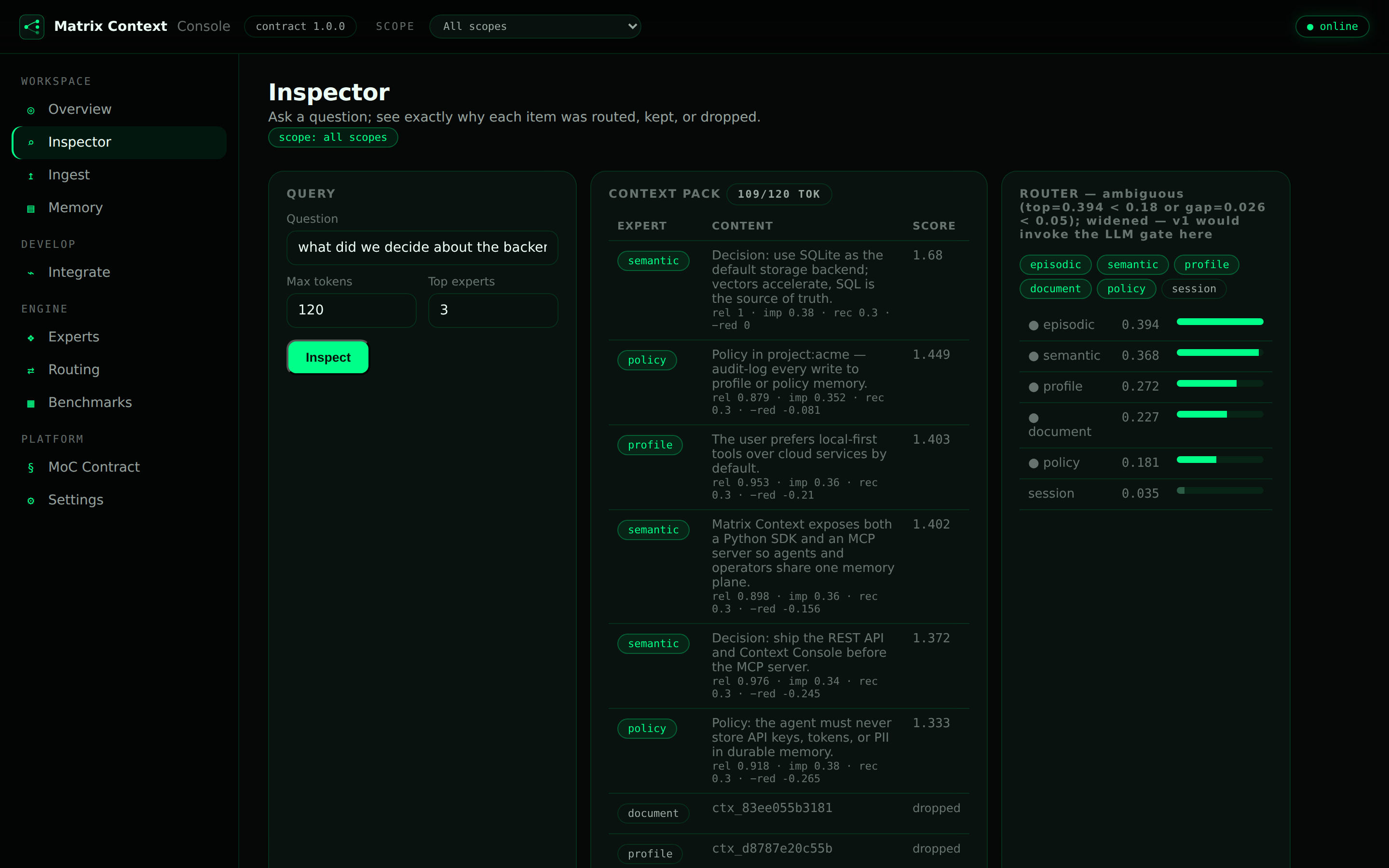
You are never guessing why the assistant recalled — or forgot — something. That auditability is a feature in its own right, and it is exactly what you want the day a bot says something it should not have.
Swap in a real model
Once the fake version works, replace fake_llm with a real model. Pick one.
Anthropic:
import anthropic
def llm(prompt: str) -> str:
    msg = anthropic.Anthropic().messages.create(
        model="claude-sonnet-4-6", max_tokens=400,
        messages=[{"role": "user", "content": prompt}],
    )
    return msg.content[0].text
A local model with Ollama (no API key, runs on your machine):
ollama pull qwen2.5:0.5b && pip install ollama
import ollama
def llm(prompt: str) -> str:
    return ollama.generate(model="qwen2.5:0.5b", prompt=prompt)["response"]
Then use llm(prompt) instead of fake_llm(prompt) in chat(). The memory loop does not change at all.
The same two calls, over REST
If your app is not in Python, run the server and make the same two calls over HTTP:
mc serve --transport rest --port 8088
# BEFORE: find useful memory
curl -s localhost:8088/v1/pack -H 'content-type: application/json' \
  -d '{"query":"What database do we use?","max_tokens":400}'

# AFTER: remember the turn
curl -s localhost:8088/v1/remember -H 'content-type: application/json' \
  -d '{"content":"User asked about the database","expert":"session"}'
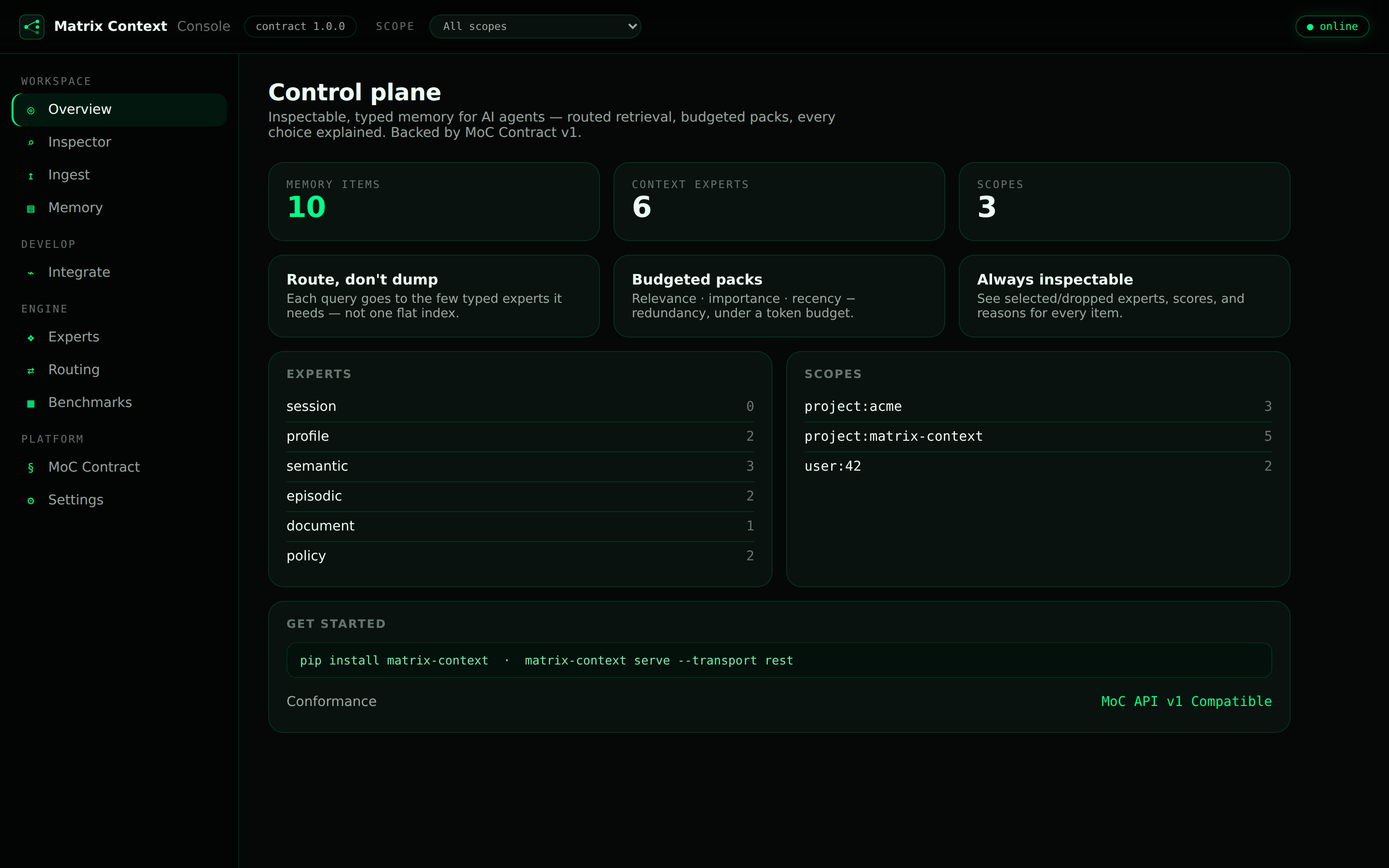
The server also ships a visual Inspector at / and a full Console at /console.
Why not just a flat vector store?
For a single fact, a vector store is fine. The difference shows up when the store grows and the questions get harder — when a user paraphrases, omits the obvious keyword, or asks something whose surface words point at the wrong, stale, or contradictory memory. A flat index ranks on similarity alone and gets lured; a router that knows the kind of memory the answer should come from stays on target. I wrote about that idea, and the public benchmark behind it, in the essay A Memory That Knows What It Remembers.
Where to go next
You now have the whole pattern: context_for before the model, record_turn after, and inspect whenever you want to know why. From here:
- Source & docs — github.com/agent-matrix/matrix-context
- The essay — A Memory That Knows What It Remembers
- Next post — give LangChain, LangGraph & CrewAI real memory
Give your assistant a memory it can account for. That is the difference between a demo and something you can trust.
Leave a comment