
I Built a Website on My Laptop — CPU Only, No Cloud, No GPU, No API Keys
A while back I wrote about turning one sentence into a governed game with GitPilot + Matrix Builder — and then about building the watsonx-only Contract Quest. Both of those leaned on a cloud model. This time I wanted to answer a harder, more honest question:
Can a multi-agent system design and build a real website with no cloud, no GPU, no API keys — on a plain laptop CPU?
The answer is yes. Below is exactly how I did it: a small local model, a bridge, a multi-agent designer, an AI coder, and a governance layer that refuses to let anything broken ship. One sentence goes in; a working, validated website comes out — and the second pass made it look genuinely professional.
The cast (and who does what)
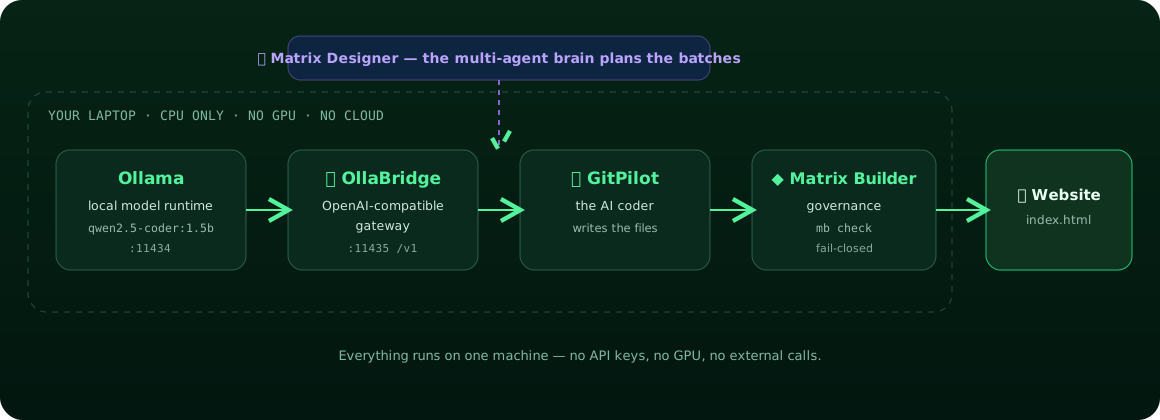
Five small, sharp tools, each with one job:
| Tool | Role | Where it runs |
|---|---|---|
| Ollama | runs a small coding LLM locally | :11434, CPU |
| OllaBridge | wraps Ollama in an OpenAI-compatible gateway | :11435 |
| Matrix Designer | the multi-agent brain that plans the batches | local |
| GitPilot | the AI coder that writes the files | local |
| Matrix Builder | the governance — validates every batch, fail-closed | local |
Nothing leaves the machine. The only “API key” in the whole system is a throwaway string I made up for the local gateway.
My box for this run: 4 CPU cores, 15 GB RAM, no GPU. That’s it.
Step 1 — A local model with Ollama
Install Ollama and start the server (it needs zstd for extraction on a fresh box):
sudo apt-get install -y zstd
curl -fsSL https://ollama.com/install.sh | sh
ollama serve &           # API on 127.0.0.1:11434
Then pull a light coding model. The whole point is “small enough to run on a CPU,” so I used
qwen2.5-coder:1.5b — under 1 GB:
ollama pull qwen2.5-coder:1.5b
A quick smoke test wrote a Hello-World page in about 11 seconds on CPU. That’s our engine.
Step 2 — Bridge it with OllaBridge
GitPilot (and most tools) speak the OpenAI chat API. Ollama has its own dialect, so I put
OllaBridge in front of it: it exposes a clean, OpenAI-compatible /v1/chat/completions, adds an
API key and rate limiting, and forwards to Ollama.
pip install ollabridge

# .env — point the bridge at our local Ollama
cat > .env <<'EOF'
HOST=127.0.0.1
PORT=11435
API_KEYS=sk-ollabridge-local-dev
OLLAMA_BASE_URL=http://127.0.0.1:11434
DEFAULT_MODEL=qwen2.5-coder:1.5b
EOF

ollabridge start --no-setup --host 127.0.0.1 --port 11435 --auth-mode local-trust
A health check confirms the bridge is live and pointed at our model:
{ "status": "ok", "mode": "gateway", "default_model": "qwen2.5-coder:1.5b", "auth_mode": "local-trust" }
Now any OpenAI client can talk to a model that’s running entirely on this laptop.
Step 3 — Point GitPilot at the local model
GitPilot supports an openai provider with a custom base URL — so I just aim it at the bridge:
export GITPILOT_PROVIDER=openai
export OPENAI_BASE_URL=http://127.0.0.1:11435/v1
export OPENAI_API_KEY=sk-ollabridge-local-dev
export GITPILOT_OPENAI_MODEL=qwen2.5-coder:1.5b
That single indirection is the whole trick: GitPilot → OllaBridge → Ollama → your CPU. The coder
never knows (or cares) that the “OpenAI” endpoint is a 1 GB model humming on your own machine.
Step 4 — Let the multi-agent brain plan the batches
Here’s where it stops being “ask a model for an HTML file” and starts being a system.
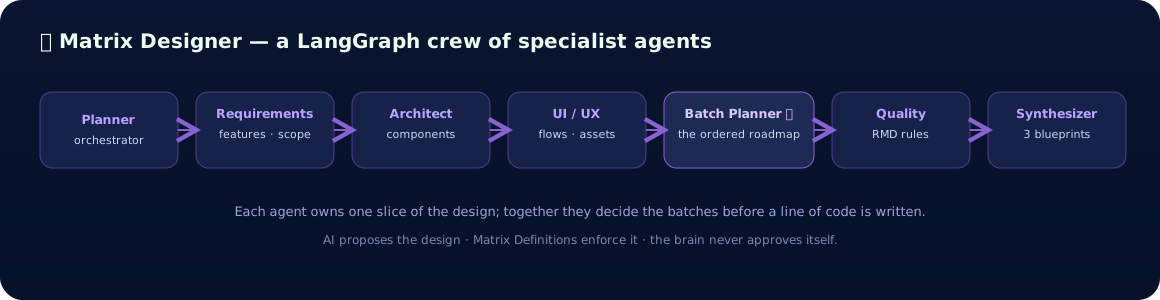
Matrix Designer is a small LangGraph crew. Each agent owns one slice of the design, and they hand off in sequence — the Planner sets the goal, Requirements extracts the features, the Architect picks the components, UI/UX sketches the flows, the Batch Planner turns it all into an ordered roadmap, Quality checks it against the rules, and the Synthesizer emits the final plan.
pip install matrix-designer
mdesign blueprints --idea "A simple Hello World static website with HTML and CSS"
# → minimal / standard / production blueprints, each with an ordered batch plan
The crucial idea: the design is decided before any code is written. The model isn’t improvising a whole site in one shot — it’s filling in small, pre-planned, pre-scoped batches. That’s the difference between “an AI made something” and “a system built something.”
Step 5 — Build it, one governed batch at a time
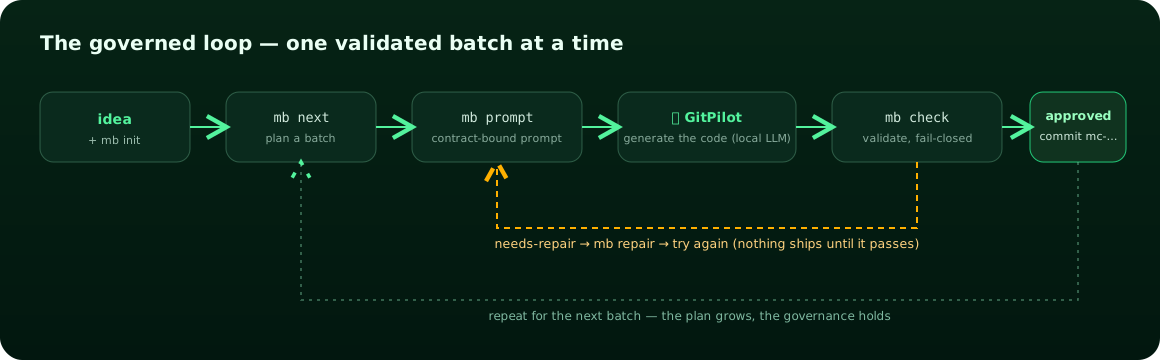
Now Matrix Builder turns the plan into a contract and runs the loop. For every batch it renders a
contract-bound prompt, lets GitPilot generate the code with our local model, and then runs
mb check — which is fail-closed: if the change steps outside the allow-list or breaks an
acceptance rule, it returns needs-repair and nothing ships.
mb init "Hello World — a clean single-file static website ..." --quality starter
# then, per batch:
mb next "<the next goal>"          # plan a scoped batch
mb prompt --coder gitpilot          # render the contract-bound prompt
gitpilot generate -m "<prompt>" -o frontend   # local model writes the file
mb check --changed frontend/index.html        # validate, fail-closed → Matrix Commit
Every batch that passed was sealed as an immutable Matrix Commit:
Batch 01  Hello World page foundation     ✓ mc-02bbd1f093de
Batch 02  Greeting button                 ✓ mc-0de0cc051dad
Batch 03  Polish (gradient + greeting)     ✓ mc-657331039ba9
MATRIX_STATUS: approved  score=100
The result
The first pass worked but looked rough — the 1.5B model put a gradient on the wrong CSS property and targeted a missing element. So I did what you’d do with any junior coder: I gave it a precise spec and ran one more governed batch. The second pass is genuinely presentable:
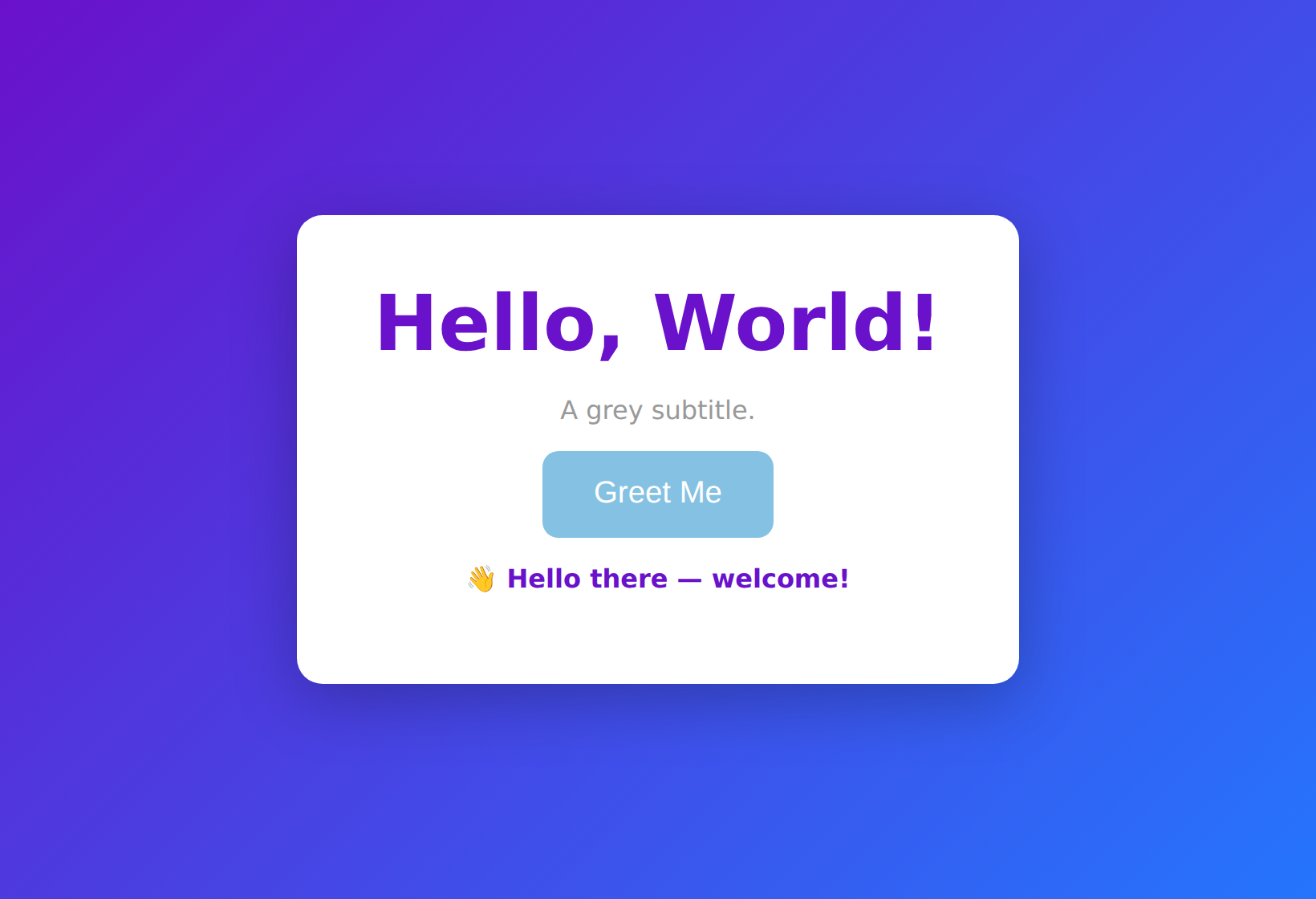 Generated 100% locally —
 qwen2.5-coder:1.5b → OllaBridge → GitPilot → validated by Matrix Builder. Shown after clicking Greet Me.
A purple gradient, a clean white card, a working Greet Me button whose JavaScript fires a friendly message — and every line was written by a model running on a CPU, under governance, with the build history to prove it.
Why this matters
- It’s private and free. No tokens leave your laptop; no per-call billing; no GPU. The same wiring runs on a Raspberry-class box or an air-gapped network.
- Small models are fine — with a system around them. A 1.5B model can’t one-shot a polished app. But planned into small, scoped, validated batches, it ships real, correct files. The leverage is the multi-agent design + governance, not the size of the model.
- The quality is a dial, not a ceiling. Want it sharper? Swap one string —
ollama pull qwen2.5-coder:7bandGITPILOT_OPENAI_MODEL=qwen2.5-coder:7b. The architecture doesn’t change at all. - Nothing broken ships.
mb checkis fail-closed, so the worst case is “this batch needs another try,” never “a broken thing got committed.”
This is the same governed pipeline from the game tutorial — only now the model is on your CPU, and a designer brain plans the batches before the coder touches a file.
Reproduce it
# 1) local model
sudo apt-get install -y zstd && curl -fsSL https://ollama.com/install.sh | sh
ollama serve & ; ollama pull qwen2.5-coder:1.5b

# 2) bridge
pip install ollabridge
ollabridge start --no-setup --port 11435 --auth-mode local-trust

# 3) wire the coder to the local model
export GITPILOT_PROVIDER=openai OPENAI_BASE_URL=http://127.0.0.1:11435/v1 \
       OPENAI_API_KEY=sk-ollabridge-local-dev GITPILOT_OPENAI_MODEL=qwen2.5-coder:1.5b

# 4) plan + build, governed
pip install matrix-designer agent-generator gitcopilot
mdesign blueprints --idea "<your idea>"
mb init "<your idea>" --quality starter
# loop: mb next → mb prompt --coder gitpilot → gitpilot generate -o <dir> → mb check
Take it further
- Matrix Designer (the brain): agent-matrix/matrix-designer
- Matrix Builder (governance): agent-matrix/matrix-builder
- GitPilot (the coder): gitpilot.ruslanmv.com
- OllaBridge (the gateway): ruslanmv/ollabridge
- The governed game build: How to Build a Governed Arcade Game
This experiment showed that useful AI software does not always require a large cloud model or expensive infrastructure. With the right system around it — planning, scoped batches, validation, and a local model — even a CPU-only setup can produce something real, private, and reproducible.
Leave a comment